
Mobile applications have evolved from being merely digital goods to becoming crucial commercial platforms. Current regulations such as PCI DSS v4.0.1 require stronger security testing, while healthcare and data-driven applications face increased scrutiny over third-party SDKs, APIs, and data privacy. Attackers are shifting to APIs and supply chains, exploiting incidents like CocoaPods flaws, while millions of devices still run outdated operating systems, leaving known holes wide open.
This guide will explain how mobile application penetration testing works, what it actually covers, the most recent security issues facing mobile applications in 2026, the differences between testing for iOS and Android, and the main security risks that businesses should consider when creating safe, reliable mobile applications throughout their lifecycle.
Why Mobile App Pentesting is Important
As per IBM's Cost of a Data Breach Report, compromised applications and APIs continue to be among the most frequent attack vectors, and companies continue to incur multi-million-dollar breach expenses. Proactive mobile application penetration testing is now crucial for lowering cyber risk and bolstering application security as mobile-first tactics and AI-powered apps continue to expand.
So, given the alarming trends in mobile app security, let's understand why pentesting is vital.
- Detect Vulnerabilities: If you don't regularly check your app, its flaws can go unnoticed. With pentesting, hackers won't be the first to discover holes in your security framework, making it possible to locate flaws and repair your app promptly.
- Protect Sensitive Data: If your app saves sensitive user data, like financial or health-related information, you must perform a rigorous pentest. It's one of the best ways to prevent access issues, unsafe information storage procedures, and more.
- Safeguard API integrations: Cybercriminals frequently target APIs to breach your system. A mobile app penetration assessment will demonstrate if your API interfaces have all the necessary security safeguards to stop unwanted access to the information and features of your app.
How Does Mobile Application Penetration Testing Work?
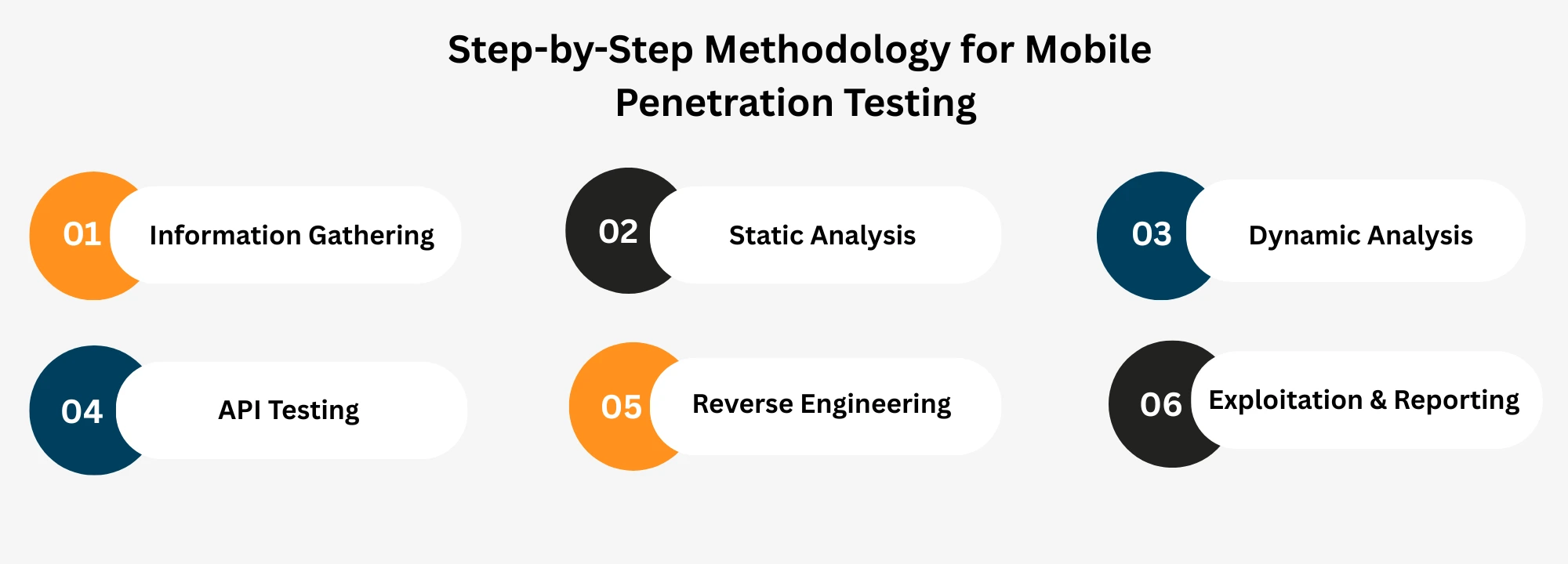
Follow this structured approach to effectively test mobile applications:
- Information Gathering
Understanding the application is the first step in any good security assessment. Collect relevant details, including APK (Android) or IPA (iOS) files, permissions, server endpoints, third-party libraries, and backend APIs.
- Static Analysis
Once the scope has been determined, the assessment proceeds to a thorough security examination. Inspect source code or decompiled binaries using tools like MobSF and JADX to identify coding flaws, insecure cryptography, or improper API usage.
- Dynamic Analysis
To find vulnerabilities that appear during application runtime, the security assessment proceeds to dynamic analysis after finishing the preliminary investigation. Use runtime tools such as Frida and Burp Suite to intercept traffic, observing behavior, and detecting real-time vulnerabilities.
- API Testing
After evaluating the application's real-time behavior, the evaluation moves on to API testing to look at security aspects of exposed interfaces and backend interactions. Assess backend APIs for authentication issues, missing rate limits, and vulnerabilities like SQL injections. Tools like Postman facilitate detailed API testing.
- Reverse Engineering
The evaluation moves on to reverse engineering to examine the internal structure and operation logic of the program after API testing. Leverage decompilation tools like APKTool and JADX to inspect proprietary logic and identify vulnerabilities.
- Exploitation & Reporting
The evaluation ends with controlled penetration and thorough reporting to confirm results and suggest suitable corrective actions after discovering possible security flaws. Safely exploit identified vulnerabilities to illustrate real-world impacts and document comprehensive remediation strategies.
iOS vs Android App Testing - Key Differences Explained
Even though both platforms strive to offer safe mobile experiences, there are significant variations in application security testing because of their different operating systems and security architectures, shown below.
| Testing Area | Android | iOS |
|---|---|---|
| Application Analysis |
|
|
| Dynamic Testing & Attack Simulation |
|
|
| Local Data Storage |
|
|
| App & System Security Checks |
|
|
| Resilience Testing |
|
|
OWASP Mobile Top 10 Overview (2024 Edition)
| OWASP Mobile Top 10 (2024) | Real-World Mobile Example |
|---|---|
| M1: Improper Credential Usage | Authentication tokens or API keys are stored insecurely, allowing attackers to impersonate users. |
| M2: Inadequate Supply Chain Security | A vulnerable third-party SDK exposes sensitive user data or enables unauthorized access. |
| M3: Insecure Authentication and Authorization | A user accesses another user's account or data due to broken authentication or authorization controls. |
| M4: Insufficient Input and Output Validation | Unsanitized input leads to SQL injection, command injection, or cross-site scripting through backend APIs. |
| M5: Insecure Communication | Sensitive information is transmitted over weak TLS configurations or vulnerable to man-in-the-middle attacks. |
| M6: Inadequate Privacy Controls | Personal or sensitive user data is collected, stored, or shared without appropriate protection or consent. |
| M7: Insufficient Binary Protections | Attackers reverse engineer or repackage the application because code obfuscation and runtime protections are missing. |
| M8: Security Misconfiguration | Debuggable builds, exposed components, or overly permissive settings remain enabled in production. |
| M9: Insecure Data Storage | Sensitive data such as tokens or PII is stored unencrypted in SQLite, SharedPreferences, or local files. |
| M10: Insufficient Cryptography | Weak encryption algorithms or poor key management expose sensitive application data. |
Common Mobile Security Breaches in 2026 and Their OWASP Impact
EngageLab Android SDK Vulnerability
An intent redirection vulnerability in the EngageLab SDK was discovered by Microsoft researchers as a result of an exported Android activity. This vulnerability could be used by a malicious program installed on the same device to misuse trusted SDK capability and get access to private data. The substantial supply chain risk posed by susceptible third-party mobile SDKs is shown by Microsoft's estimate of the SDK's 50 million installs, of which about 30 million were cryptocurrency wallet applications.
Impact
- Exposed the dangers of using vulnerable third-party SDKs.
- Demonstrated how incorrect application setups might result in unapproved data access.
- Emphasized the need to examine third-party components when doing security testing.
Android Framework Security Vulnerabilities
Google's April 2026 Android Security Bulletin addressed several high-severity framework vulnerabilities, including one that could be exploited under specific conditions without user interaction. While platform updates help address these issues, applications must also follow secure development practices to reduce their exposure.
Impact
- Showed how denial-of-service (DoS) scenarios caused by framework flaws might affect application stability and device availability.
- Emphasized how crucial it is to install Android security updates as soon as possible to minimize exposure to known platform issues.
- Emphasized that to reduce total risk, secure application development techniques must be used in conjunction with prompt operating system patching.
Mobile Application Penetration Testing Tools in 2026
Instead of depending on a single solution, security experts use an assortment of tools to imitate authentic attack scenarios and verify security measures throughout the evaluation. The most popular mobile application penetration testing tools in 2026 for finding vulnerabilities in iOS and Android apps are listed below.
| Tool | Primary Purpose | Platform |
|---|---|---|
| MobSF (Mobile Security Framework) | Performs static and dynamic security analysis to identify common vulnerabilities in Android and iOS applications. | Android, iOS |
| Burp Suite | Intercepts, analyzes, and modifies application traffic to evaluate API security, authentication, and network communication. | Android, iOS |
| Frida | Enables runtime instrumentation to observe application behavior, bypass security controls, and validate runtime protections. | Android, iOS |
| Objection | Built on Frida, it simplifies runtime testing for mobile applications without modifying the application binary. | Android, iOS |
| JADX | Decompiles Android APK files to review application logic, configuration, and hardcoded information. | Android |
| APKTool | Decodes APK resources and AndroidManifest files to support reverse engineering and security analysis. | Android |
2026 Mobile Threat Watchlist
Stay alert to these emerging threats:
- Fake-App Statistics: Monitor the increasing prevalence of fake apps infiltrating app stores
- SDK Poisoning: Audit third-party SDKs regularly to prevent vulnerabilities from compromised sources
- AI Malware: Adaptive threats built with artificial intelligence
- Mandatory Pinning Controls: Enforce SSL/TLS certificate pinning to secure communication against interception and manipulation
Best Practices for Mobile Penetration Testing
- Always conduct testing in sandboxed devices or emulators and use both rooted/jailbroken and stock devices to simulate real attack scenarios.
- Use static analysis to detect insecure code, hardcoded keys, or weak cryptography, and dynamic analysis to observe how the app behaves at runtime.
- Since most mobile apps depend heavily on backend APIs, focus on authentication, authorization, rate limiting, and data exposure.
- Validate how sensitive data is stored; use Android Keystore or iOS Keychain, never plaintext files or insecure local databases.
- Confirm strong TLS configurations, certificate pinning, and resistance to man-in-the-middle (MITM) attacks.
- Audit SDKs and libraries to ensure they are trusted and up to date, reducing supply chain risks.
- After fixes are applied, retest to confirm vulnerabilities are closed and no regressions are introduced.
- Automate security testing with CI/CD pipelines so vulnerabilities are caught before deployment.
Compliance and Security Frameworks for Mobile Application Penetration Testing
A thorough penetration test for mobile applications should be in line with accepted security guidelines and legal regulations. These frameworks assist companies in assessing application security, finding weaknesses, and fulfilling industry-specific regulatory requirements.
- OWASP MASVS: Provides a comprehensive checklist for verifying mobile application security controls and testing against common threats.
- NIST SP 800-163: Provides guidance for vetting the security of mobile applications before deployment, helping organizations assess application risks and make informed deployment decisions.
- PCI DSS: Ensures mobile applications handling payment card data are tested for vulnerabilities that could expose financial information.
- HIPAA: Requires security assessments to protect Protected Health Information (PHI) from unauthorized access and data breaches.
- ISO/IEC 27001: Supports a risk-based approach to information security and strengthens security controls throughout the application lifecycle.
Why Choose Professional Mobile Application Penetration Testing?
Security assessments need to go beyond automated testing and checklist-based inspections as mobile applications grow increasingly feature-rich and networked. Throughout the software development lifecycle, a professional mobile application penetration test helps organizations make well-informed security decisions by offering a thorough assessment of an application's performance under realistic attacks.
Beyond identifying vulnerabilities, a well-conducted evaluation adds value. It helps companies improve application security and promote long-term resilience by combining technical know-how, industry-accepted techniques, and useful remediation advice.
Moving Forward
Developing secure mobile applications is a constant improvement process. Frequent security evaluations offer the visibility required to test current policies, enhance long-term resilience, and adjust to changing threats.
Knowing your current level of security is a useful first step if you're looking for ways to improve the security of your iOS or Android application. The clarity required to prioritize security activities, promote future development, and increase confidence in each release can be obtained through the appropriate assessment.
Conclusion: Embracing Zero-Trust for Mobile
Adopting a zero-trust security model has become essential. Zero-Trust requires continuous verification and limited access, significantly reducing breaches from compromised mobile devices or apps. Regular penetration testing, adherence to best practices, and robust compliance ensure strong, resilient mobile security in 2026.
Take Action Now! Download our Mobile Pen Testing Checklist
Need expert guidance on penetration testing or compliance? Contact us to book a mobile zero-trust readiness call today!