
Attackers now break in through exploitable vulnerabilities more than any other way. Verizon’s 2026 Data Breach Investigations Report found that 31% of breaches start with vulnerability exploitation.1 Pen testing finds those weak spots first.
This 2027 pen testing guide covers what pen testing is, the main test types, how to scope a test, the methods testers follow, how AI is changing the work, the tools involved, what reports include, what testing costs, and how to choose a provider.
What Is Pen Testing?
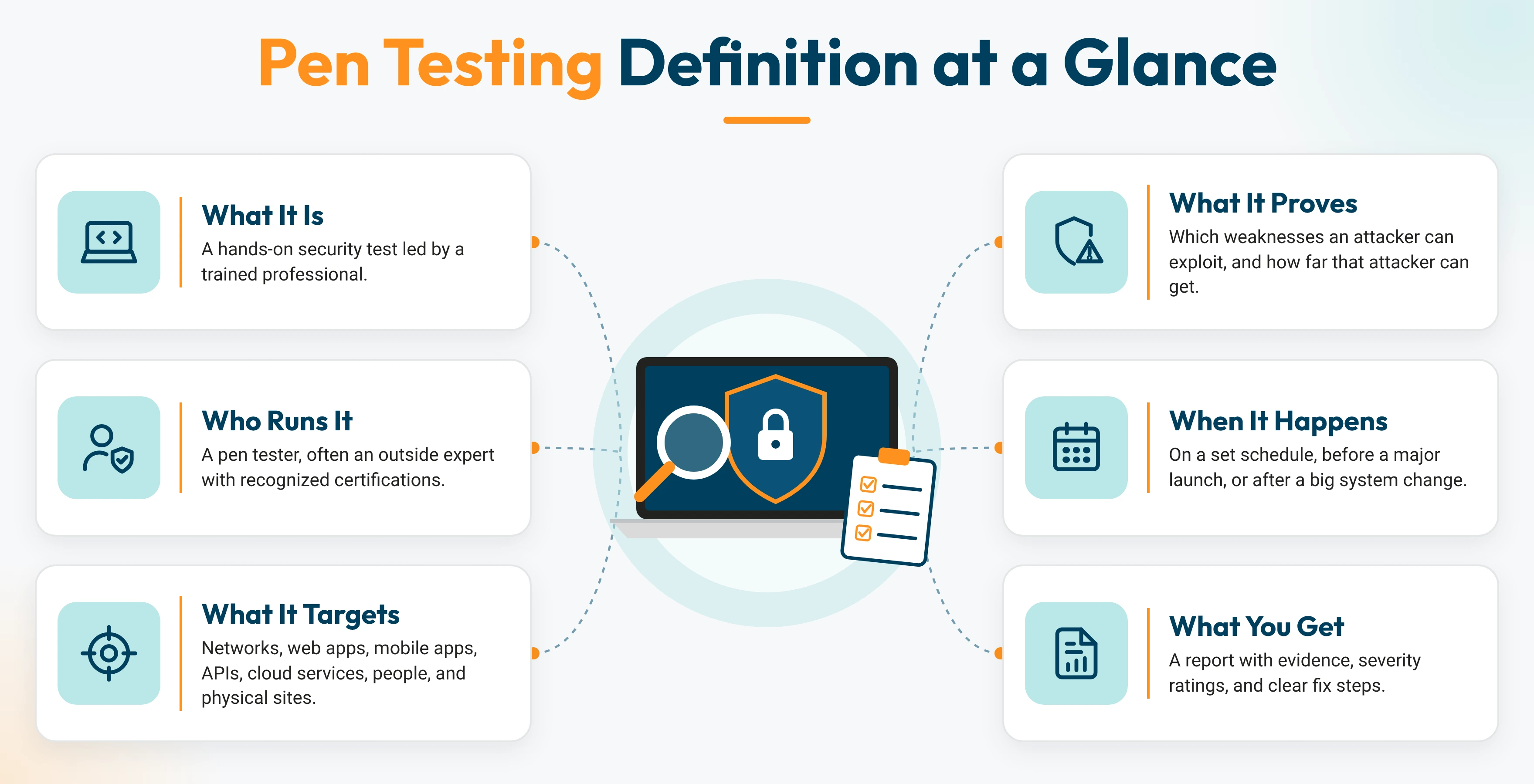
penetration testing (or pen testing) is an authorized, simulated attack on the networks, applications, and cloud services a business runs on every day, to find and exploit security weaknesses before real attackers do.
A penetration test answers one clear question: what can an attacker actually reach?
Pen testing is a core part of ethical hacking. The tester follows a signed agreement that defines targets, methods, and timing. Every action stays inside that agreement. This written authorization keeps the work legal and ethical.
How a Pen Test Works
Every pen test follows the same five stages. Each stage builds on the one before it.
- Plan: You and the tester agree on goals, in-scope assets, test dates, and rules of engagement.
- Discover: The tester lists every reachable server, app, and user account.
- Exploit: The tester breaks in and moves from system to system to see what data it can reach.
- Report: The tester ranks each finding by severity and explains how to fix it.
- Retest: The tester reruns each attack to confirm the fix works.
Why Organizations Run Pen Tests?
One exploited vulnerability can drain your budget, expose your customers, freeze your operations, and put your company’s name in the headlines.
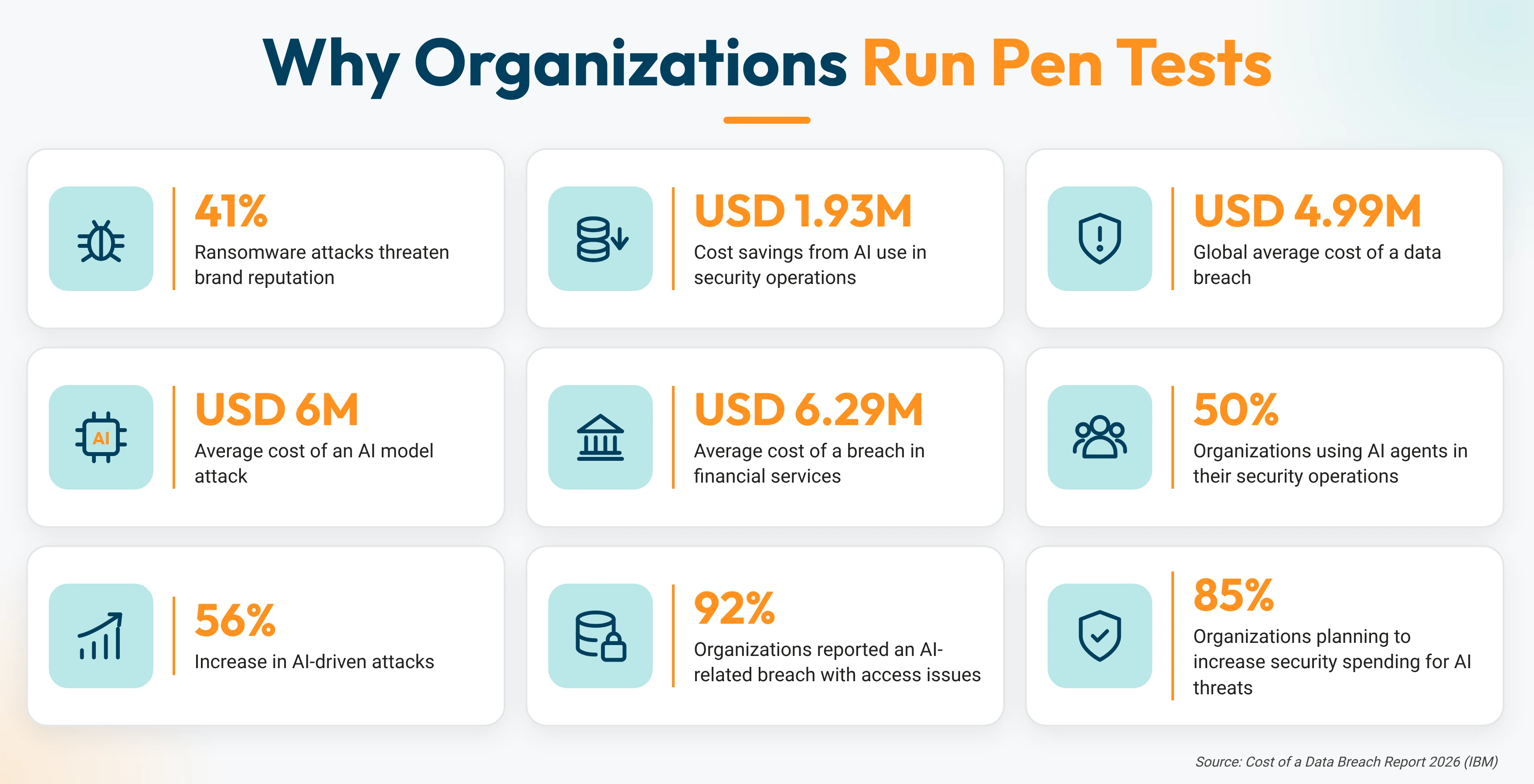
Security tools show you what you have in place. A pen test shows what an attacker can do against it. Most pen testing decisions come from the space between those two things. In a pen testing cyber security program, each test serves three goals: lower risk, stronger defenses, and evidence auditors will accept.
Must Read: What Attackers Are Targeting Right Now?
Benefits of Pen Testing
A pen test pays off for everyone in the building, from the help desk to the boardroom. Here are the benefits of pen testing in everyday terms:
- Proactive Attack Prevention: Find the open admin portal, the default printer password, and the unpatched server before an attacker does.
- Avoids Costly Security Incidents: Fix an exposed cloud storage bucket in an afternoon, and skip the forensic investigation, legal reviews, and customer notification letters.
- Regulatory Compliance: Hand PCI DSS assessors and SOC 2 and ISO 27001 auditors a current report and a retest letter in one file.
- Validates Existing Controls: See whether your firewall, MFA, and endpoint protection actually stop a real attack.
- Improved Incident Response: Test whether alerts fire, who responds, and how fast your team locks a compromised account.
- Smarter Security Investments: Back every budget request with a tested finding, such as the phishing email that got past your filter.
- Builds Trust with Stakeholders: Give boards, enterprise buyers, and insurers proof that you test your defenses.
Pen Testing Supports Compliance
For many organizations, the first pen test comes from a compliance framework requirement. Three frameworks come up most often:
- PCI DSS Pen Testing: PCI DSS 4.0 Requirement 11.4 calls for internal and external pen tests at least once every 12 months2 and after any significant change. Every business that stores, processes, or transmits cardholder data falls under this rule.
- SOC 2 Pen Testing: SOC 2 lets each company choose how it tests its controls. Auditors often ask for a recent pen test as evidence for the monitoring criteria in CC4.1.3
- ISO 27001 Pen Testing: ISO/IEC 27001:2022 asks organizations to manage technical vulnerabilities under Annex A control 8.8.4 A pen test gives auditors direct proof that this control works.
One well-scoped test can produce evidence for several frameworks at once. That saves time and budget, and it gives your team one remediation plan to follow.
Pen Testing vs. Vulnerability Scanning and Red Teaming
A scanner tells you a door might be unlocked. A pen tester walks through it. A red team walks through it, rides the elevator to the server room, and checks whether anyone on your security team spotted them.
Pen Testing vs. Vulnerability Scanning
Vulnerability scanning lists possible weaknesses with automated tools. Pen testing, on the other hand, proves which of those weaknesses an attacker can exploit and how far that attacker can get.
A scan runs automatically. Tools such as Nessus compare your systems against a database of known flaws and produce a list of possible issues. A vulnerability assessment adds a human review. An analyst confirms each result, removes false alarms, and ranks every issue by risk.
The pen test vs. vulnerability assessment question comes down to exploitation. A pen tester uses those weaknesses to break in, chains them together, and shows the exact path to your customer records or admin accounts.
Red Team Pen Testing
Red team penetration testing (often called a red team exercise or adversary emulation) is a comprehensive, goal-driven cybersecurity simulation that runs a full attack against the whole organization.
Red team pen testing copies a real criminal group. It targets your employees, office buildings, and networks to reach one high-value goal, such as the finance system or the customer database.
The red team uses any approved method to get there. That can include phishing emails, a cloned employee badge at the front door, or an attack on an unpatched VPN. Only a few leaders know the test dates. The real target is your security team’s ability to detect and stop the attack.
Here isa tabular view showcasing what separated each:
| Differentiator | Vulnerability Scanning | Pen Testing | Red Teaming |
|---|---|---|---|
| Core Question | Which known flaws exist? | What can an attacker reach? | Can our team spot and stop an attack? |
| Primary Goal | Inventory known weaknesses | Prove real-world impact | Test detection and response |
| Approach | Fully automated | Human-led, tool-assisted | Human-led, objective-driven |
| Exploitation | Detection only | Full exploitation of in-scope targets | Full exploitation along the path to one goal |
| Attack Chaining | Single issues | Links weaknesses into attack paths | Chains people, process, and technology end to end |
| Scope Breadth | Every reachable asset | Defined set of systems | Whole organization |
| Testing Depth | Surface level | Deep | Deepest along the target path |
| Who Performs It | IT or security team with a tool | Certified pen tester | Red team operators |
| Skill Level | Low to moderate | High | Expert |
| Common Tools | Nessus, Qualys, OpenVAS | Nmap, Burp Suite, Metasploit, Wireshark | Custom tooling, command-and-control frameworks, phishing kits |
| Social Engineering | Outside scope | Optional add-on | Core technique |
| Physical Access Testing | Outside scope | Optional add-on | Common technique |
| False Positives | Common | Eliminated through proof | Eliminated through proof |
| Defender Awareness | Fully announced | Usually announced | Known to a small group of leaders |
| Stealth | Loud and visible | Moderate, set by scope | Quiet, mimics real adversaries |
| Tests Detection and Response | Outside scope | Partial | Primary focus |
| Typical Duration | Minutes to hours | Days to weeks | Weeks to months |
| Typical Frequency | Continuous or on a set schedule | Yearly and after major changes | Yearly or as the program matures |
| Relative Cost | Lowest | Moderate to high | Highest |
| Disruption Risk | Low | Moderate, controlled by rules of engagement | Moderate, controlled by rules of engagement |
| Main Deliverable | Raw list of findings | Findings with proof of concept, attack narrative, and fix steps | Full attack story, detection timeline, and executive debrief |
| Remediation Guidance | Generic vendor fixes | Step-by-step fixes per finding | Process, people, and technology improvements |
| Retesting | Next scheduled scan | Targeted retest of each finding | Follow-up exercise or purple team session |
| Reference Frameworks | CVE database | OWASP WSTG, PTES, NIST SP 800-115 | MITRE ATT&CK |
| Compliance Role | Supports PCI DSS scan requirements | Required by PCI DSS, supports SOC 2 and ISO 27001 | Used in advanced financial sector programs such as TIBER-EU5 |
| Security Maturity Needed | Any | Basic controls in place | Mature program with a security operations team |
| Best For | Ongoing security hygiene | Proving risk, compliance, and new launches | Testing people, processes, and response |
When to Use Vulnerability Scanning, Pen Testing, or Red Teaming
Use vulnerability scanning to keep watch all year, pen testing to prove real risk, and red teaming to test how well your team responds to an attack. Most organizations work through all three as their security program grows.
Choose vulnerability scanning when you need to:
- Check every system for known flaws on a set schedule
- Catch missing patches after each monthly update cycle
- Meet framework rules that call for regular scans, such as PCI DSS
Choose a pen test when you need to:
- Prove which weaknesses an attacker can actually exploit
- Meet a PCI DSS, SOC 2, or ISO 27001 audit requirement
- Clear a new app, cloud environment, or major release before launch
- Answer an enterprise customer’s security questionnaire
Choose red teaming when you need to:
- Test whether your security team spots and stops a real attack
- Check people, processes, and technology together
- Build on a security program that already runs regular scans and pen tests
For a deeper look at the difference between assessments and pen tests, read Pen Test vs. Vulnerability Assessment.
Types of Pen Tests
Every organization has a different attack surface. A retailer runs an online store, a hospital runs patient portals, and a manufacturer runs plant networks. The types of pen test below fall into five target families. A final group sorts them by how much the tester knows going in.
Network Pen Testing
Network pen testing is a security test that checks an organization’s internet-facing systems, internal networks, and Wi-Fi for weaknesses an attacker could exploit.
Here are the types of network pen testing:
External Pen Testing
An external pen test is a security test that targets an organization’s internet-facing systems, such as websites, email servers, and VPN portals, to find weaknesses an outside attacker could exploit.
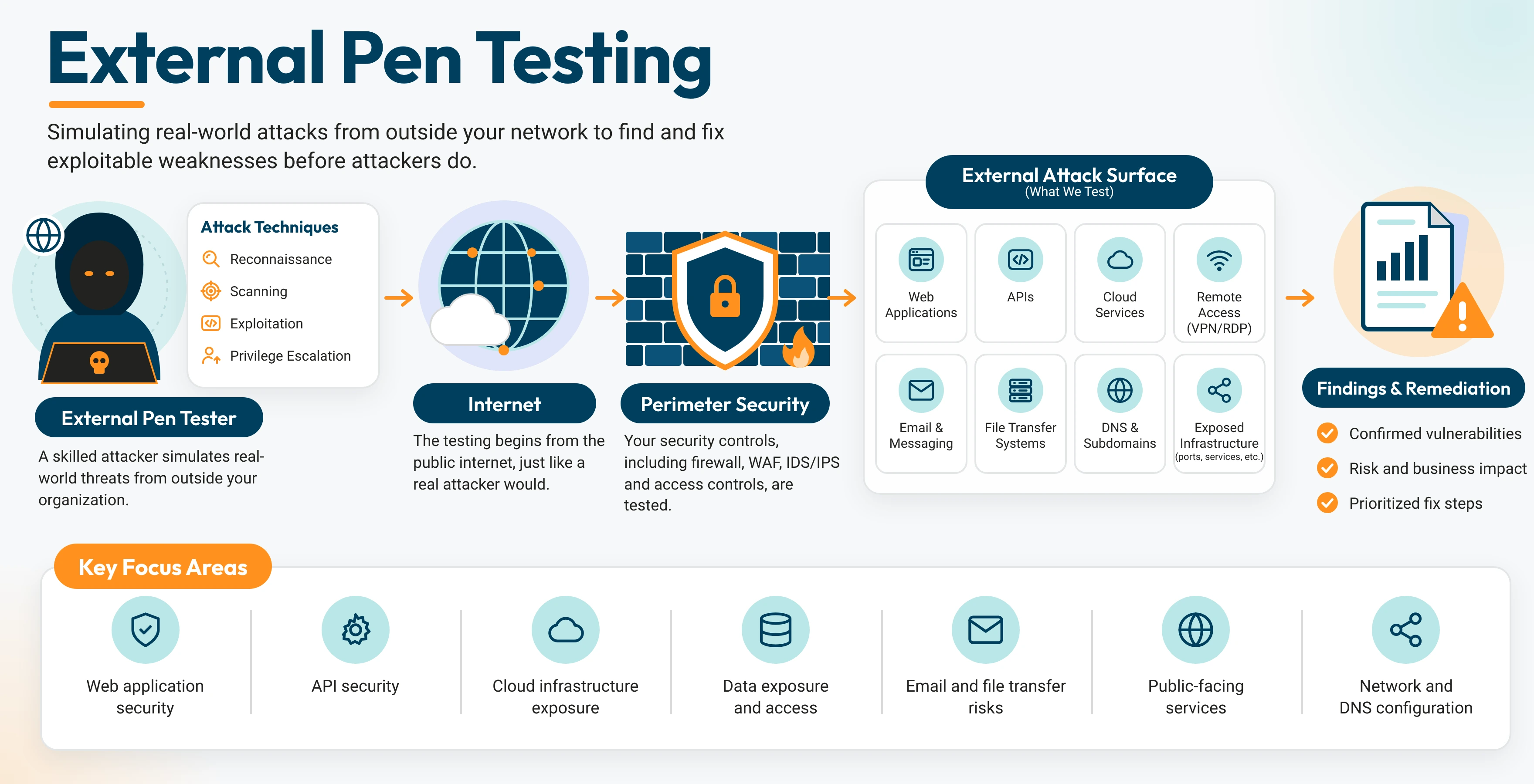
Example: A credit union’s external test flagged a remote access portal running outdated software. The team patched it and limited access to company devices.
Internal Pen Testing
Internal pen testing is a security test that starts inside an organization’s network to measure how far an attacker could move from an employee device or account.
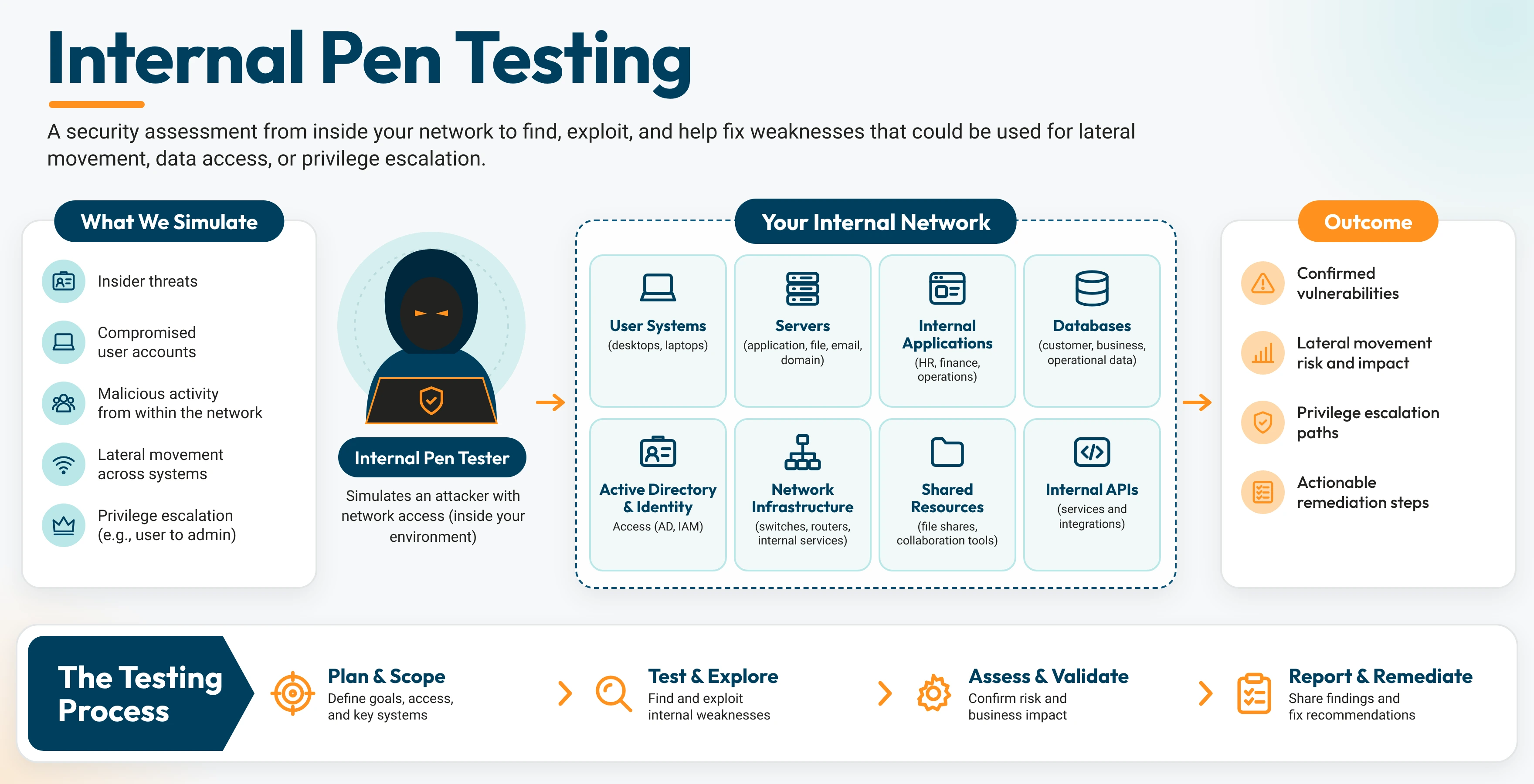
Example: A law firm’s test found that every staff account could open the shared file server. The firm set folder access by practice group.
Wireless Pen Testing
Wireless pen testing is a security test that checks an organization’s Wi-Fi networks, guest access, and connected devices for weaknesses that could open a path into the network.
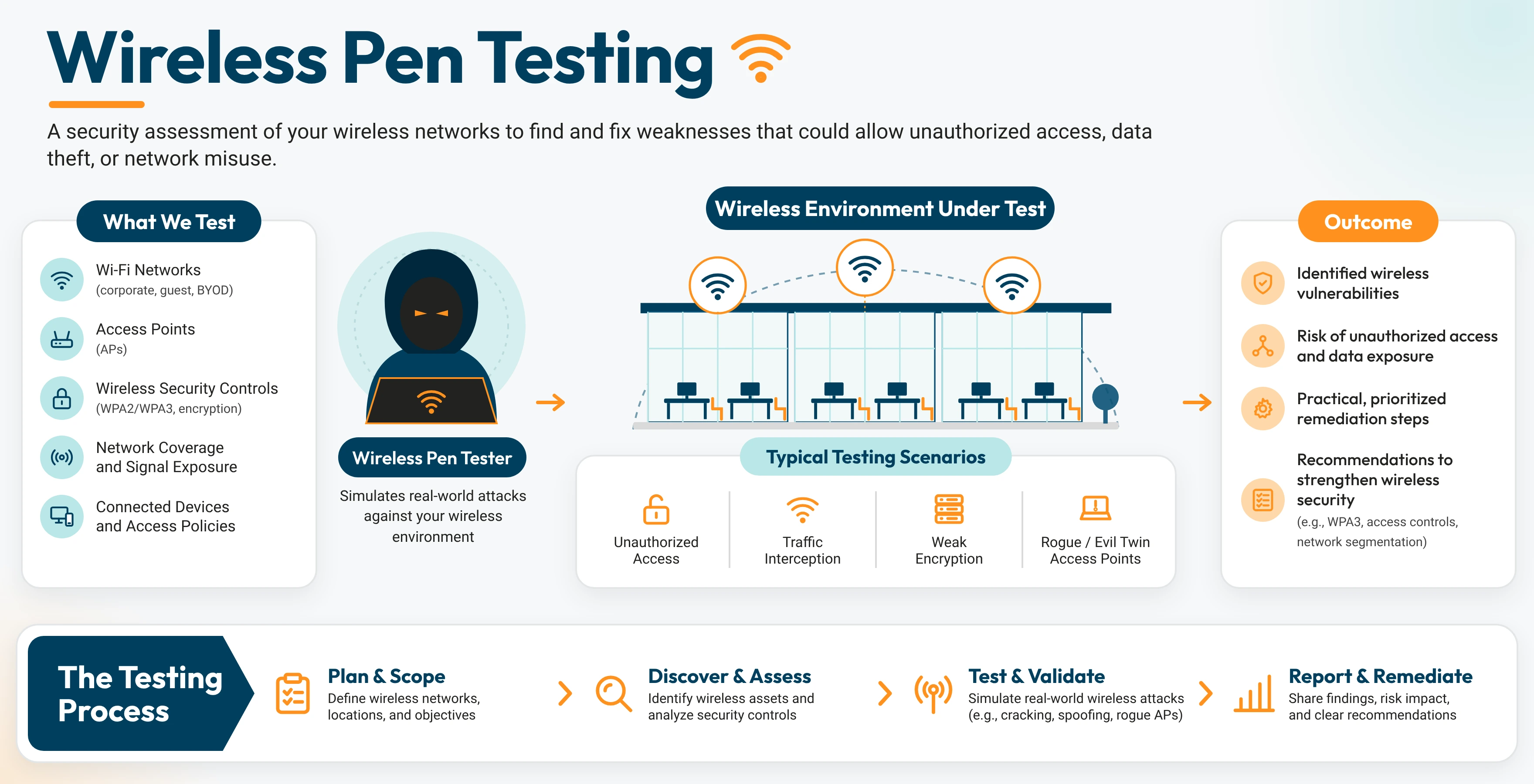
Example: A hotel’s test found that guest Wi-Fi shared a network with front desk computers. The team split them into separate networks.
Application Pen Testing
Application pen testing is a security test that checks websites, mobile apps, and APIs for flaws in logins, data handling, and user permissions.
Web Application Pen Testing
Web application pen testing is a security test that checks websites and web apps for flaws in logins, forms, payment flows, and user permissions.
Here is how to pen test a website. The tester first maps every page, form, login, and connected service. Next, they review password rules, reset flows, and session timeouts. They check how forms and search boxes handle input, using the OWASP Web Security Testing Guide as the checklist. Then they confirm each user role sees only its own data. Every finding gets a severity rating, a clear fix, and a retest.
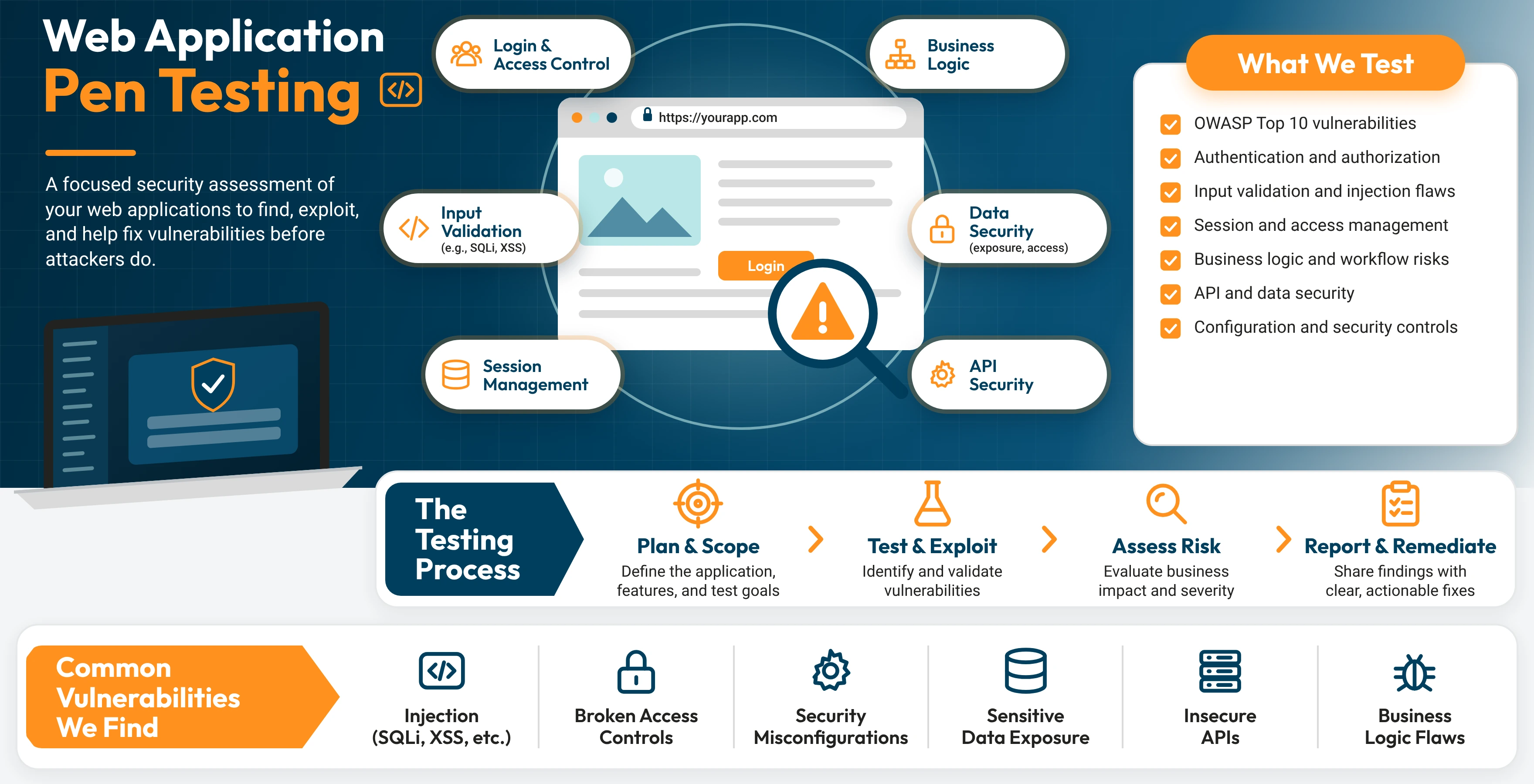
Example: An online retailer’s test showed that customers could open other customers’ order pages. The developers added an ownership check to every order page.
Read more: Web App Penetration Testing Guide
Mobile Application Pen Testing
Mobile application pen testing is a security test that checks native iOS and Android apps and hybrid apps, along with the data they store and the servers behind them. Hybrid apps include those built with React Native, Flutter, or Ionic.
Testers review how the app stores data on the phone, signs users in, encrypts its traffic, and talks to its back-end APIs. Hybrid apps add one more layer to test, which is the web code running inside the app. Each test follows the OWASP Mobile Application Security Testing Guide.
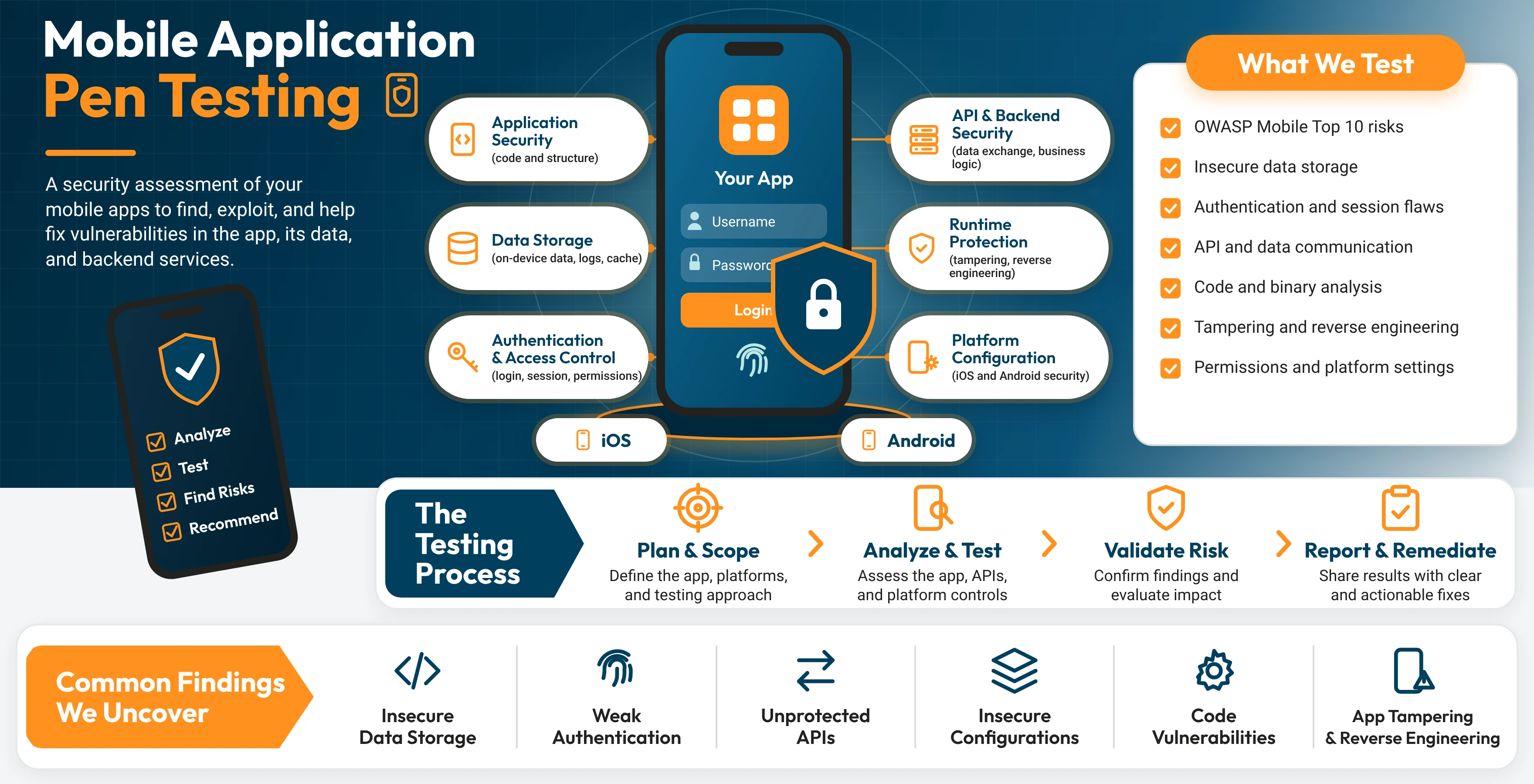
Example: A retail app built with React Native kept customer session tokens in unencrypted local storage. The team moved them into the iOS Keychain and Android Keystore.
Read more: The Ultimate Guide to Mobile Application Penetration Testing
API Pen Testing
API pen testing is a security test that checks application programming interfaces for flaws in authentication, access rules, and data exposure between apps, partners, and systems.
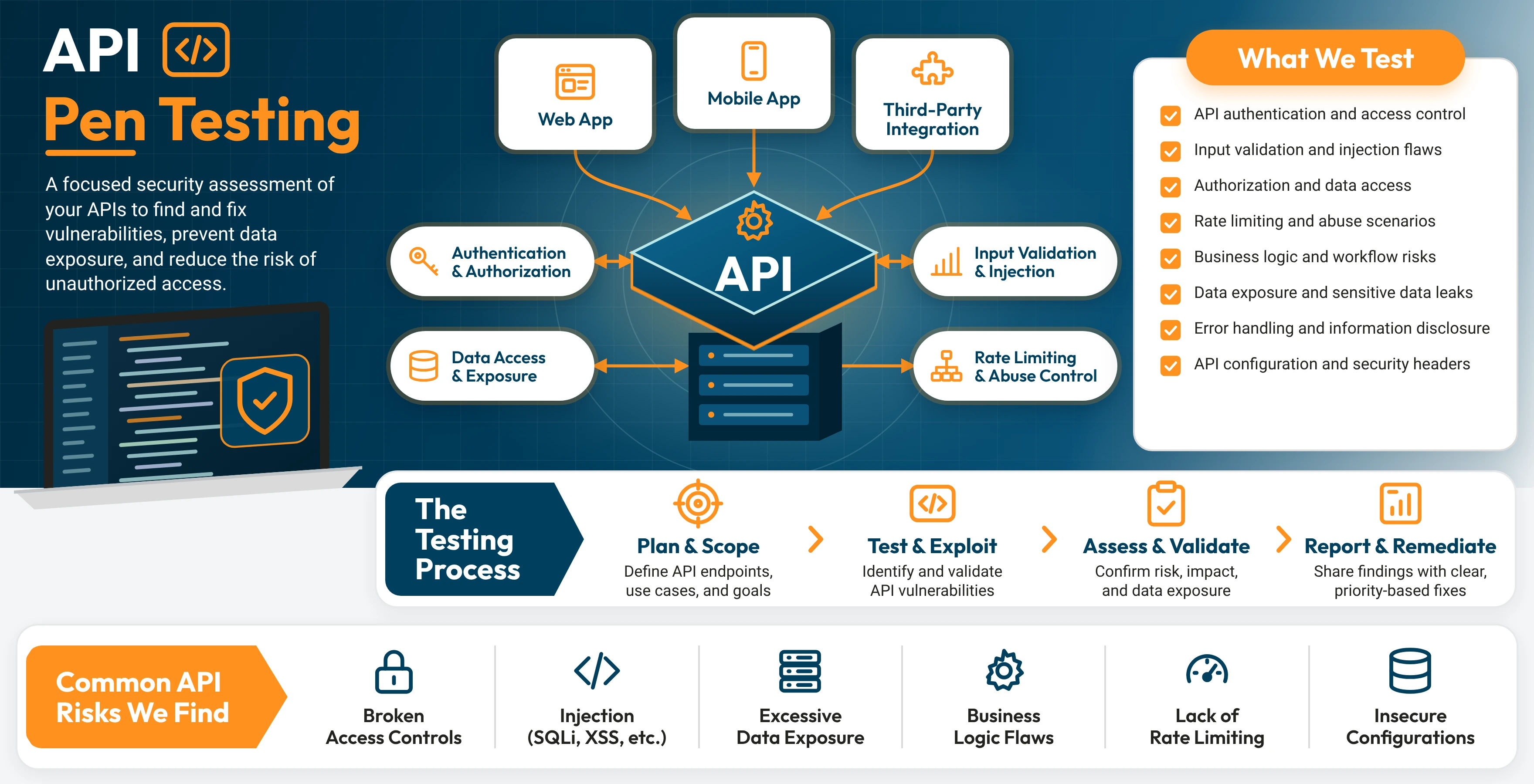
Example: A logistics company’s partner API returned shipment records from every partner. The team limited each response to the requesting partner’s own records.
Cloud Pen Testing
Cloud pen testing is a security test that checks AWS, Azure, and Google Cloud environments for misconfigurations, weak permissions, and exposed data. Here is one of the most widely practiced types of cloud pen testing.
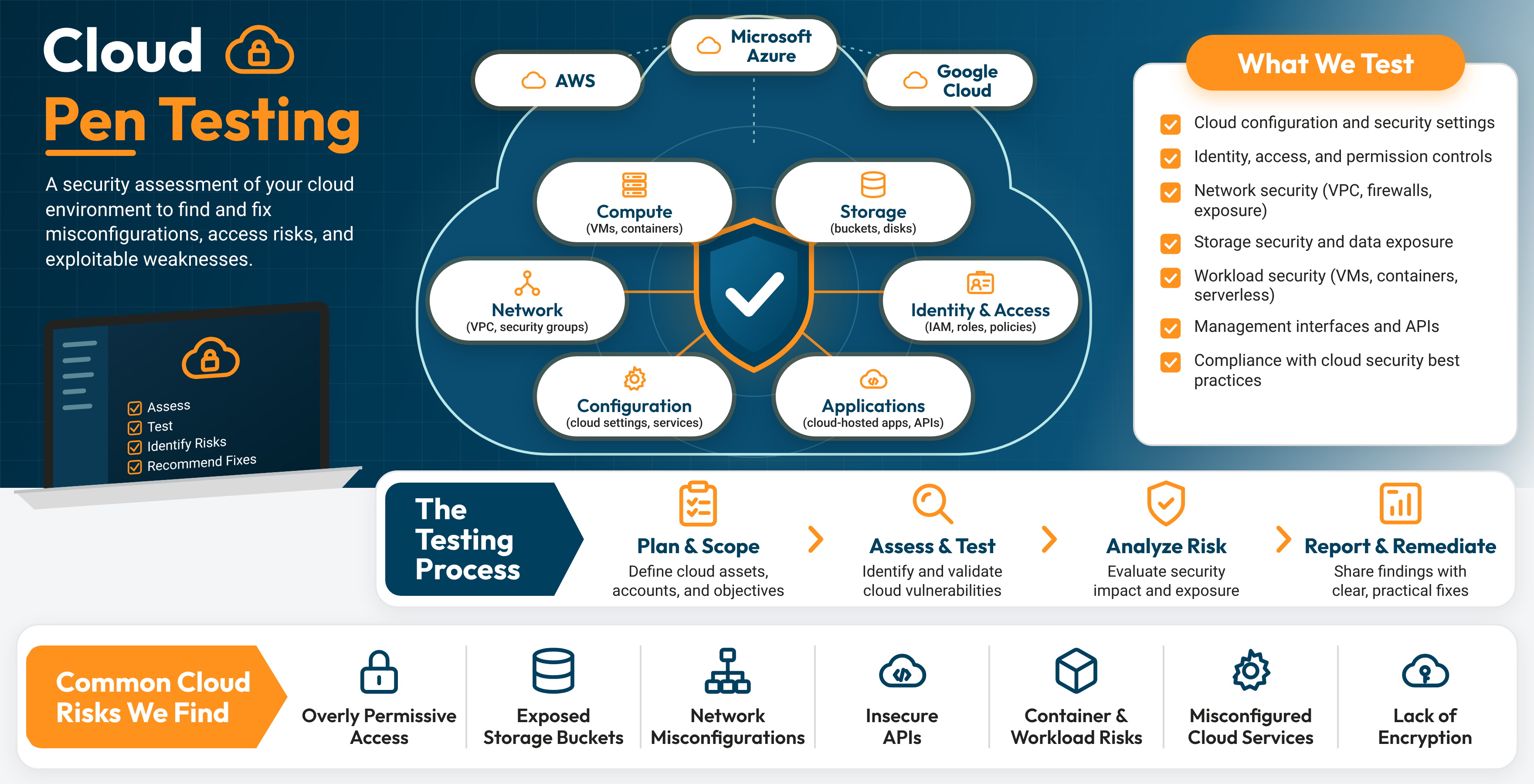
AWS Pen Testing
AWS pen testing is a security test that checks an Amazon Web Services environment, including storage buckets, identity permissions, and network rules, for misconfigurations and exploitable weaknesses. Cloud security testing applies the same approach to Azure and Google Cloud.
Example: A software company’s test found a storage bucket with public read access that held customer exports. The team made it private and set alerts for permission changes.
People and Physical Pen Testing
People and physical pen testing is a security test that checks how employees, buildings, and access controls hold up against real-world deception and entry attempts.
Social Engineering
Social engineering is part of pen testing because attackers target employees as often as systems, and a phishing simulation measures how staff respond to deceptive emails, calls, and messages.
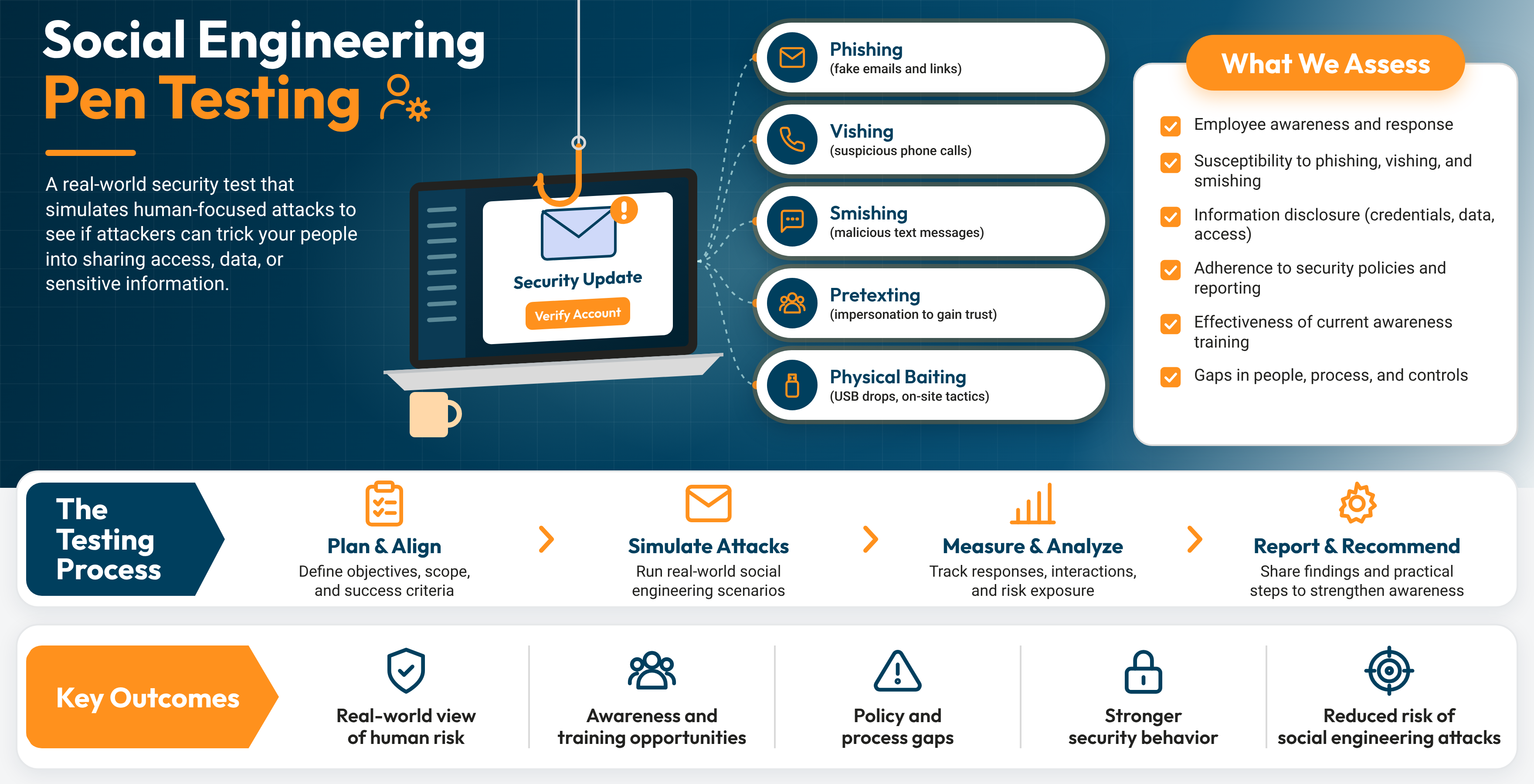
Example: A hospital’s phishing simulation showed strong reporting in finance and lower reporting in scheduling. Focused training for scheduling staff lifted reports on the next round.
Physical Pen Testing
Physical pen testing is a security test that checks how well an organization’s doors, badge systems, visitor procedures, and server rooms protect sensitive equipment and data.
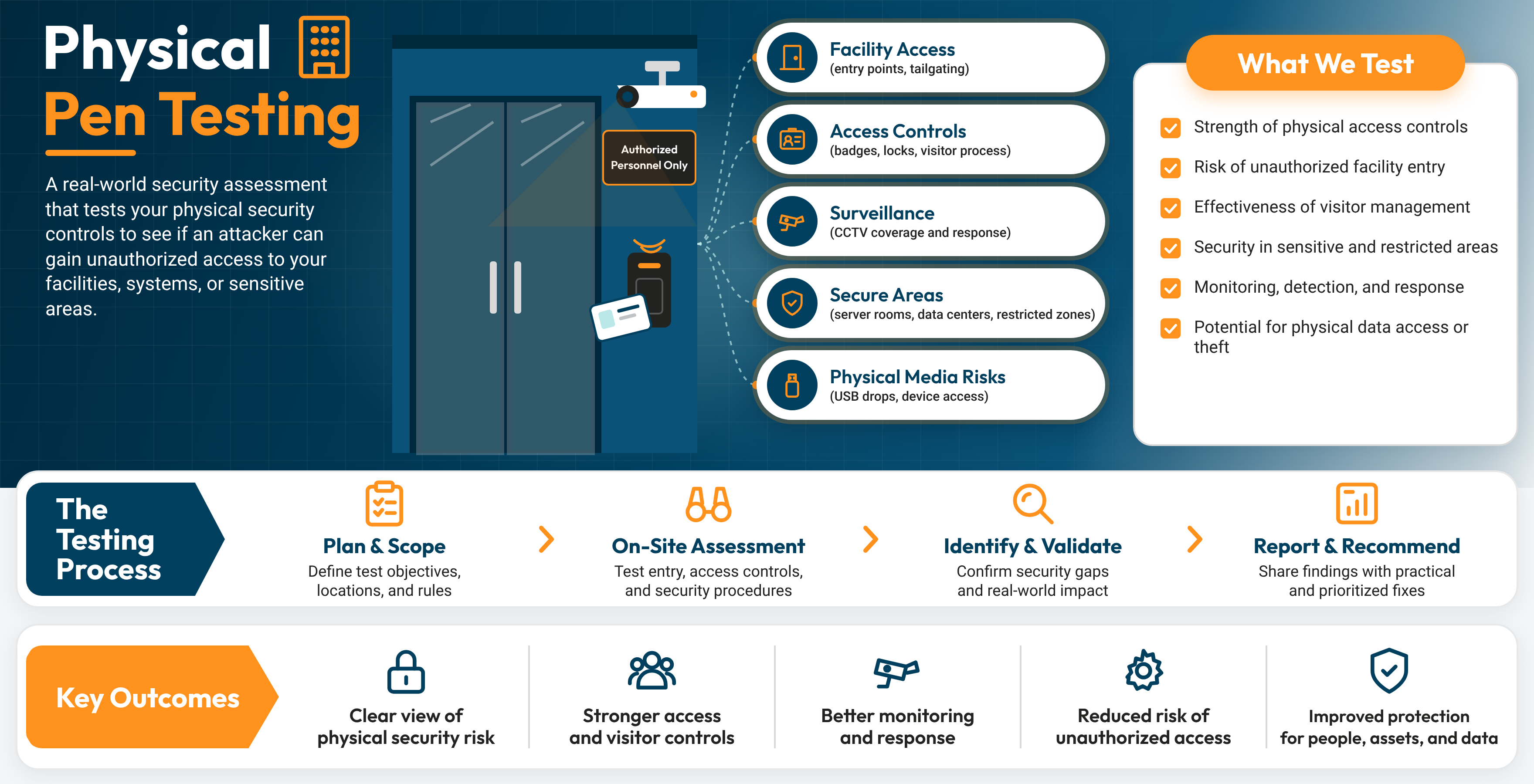
Example: A data center’s test showed a side door left propped open during shift changes. The facilities team added a door alarm and a shift-change checklist.
Specialized Pen Testing
Specialized pen testing is a security test built for connected devices, industrial systems, and AI applications, each with its own risks and safety rules.
IoT Pen Testing
IoT pen testing is a security test that checks connected devices, such as cameras, smart building controls, and medical devices, along with the apps and networks that run them.
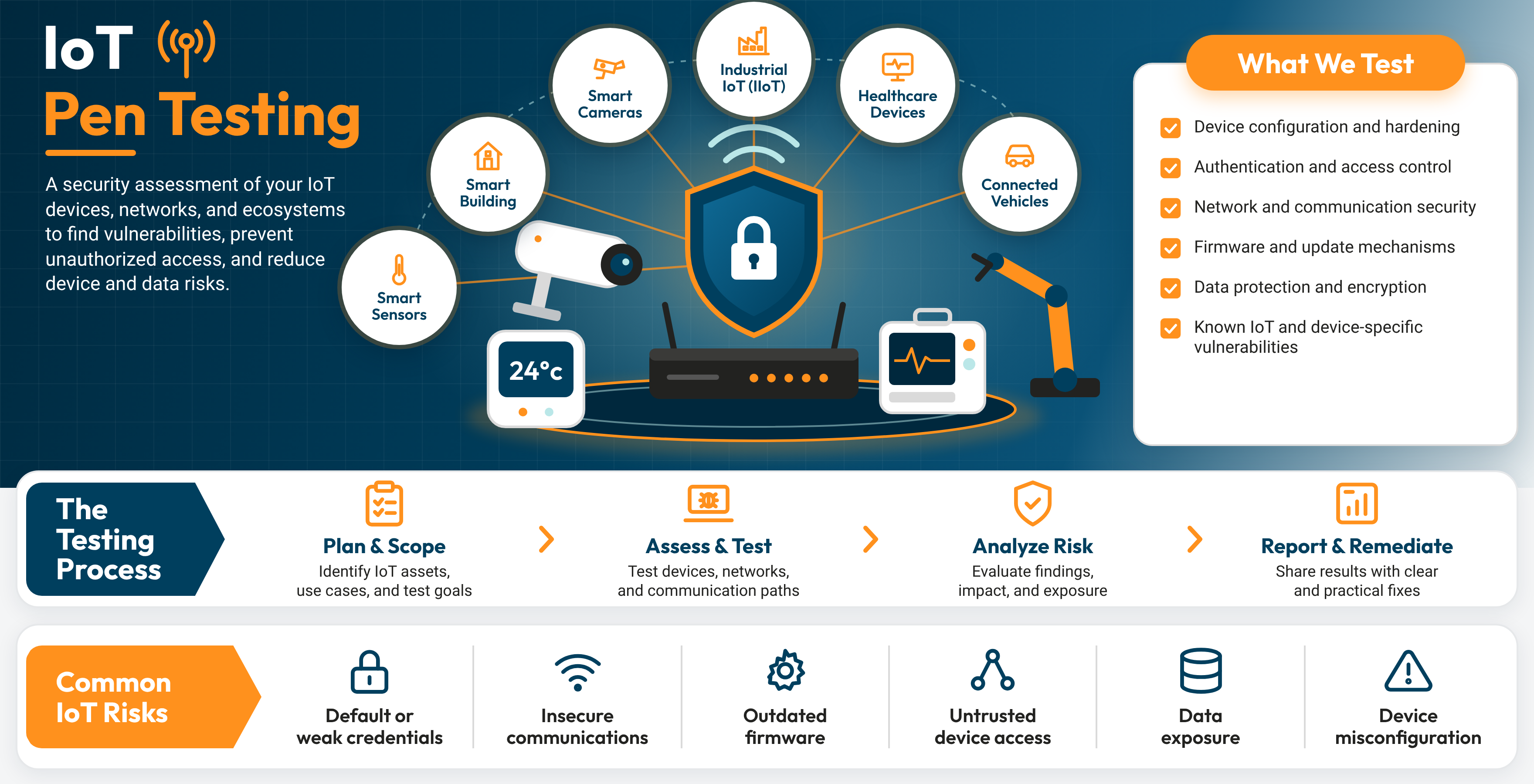
Example: An office building’s test found HVAC controllers still on factory passwords. The team reset them and moved the controllers onto their own network.
Read More: How to Scope IT-OT Penetration Testing Safely
OT and ICS Pen Testing
OT and ICS pen testing is a safety-controlled security test that checks the industrial systems that run plants, utilities, and production lines, such as PLCs, SCADA, and HMIs.
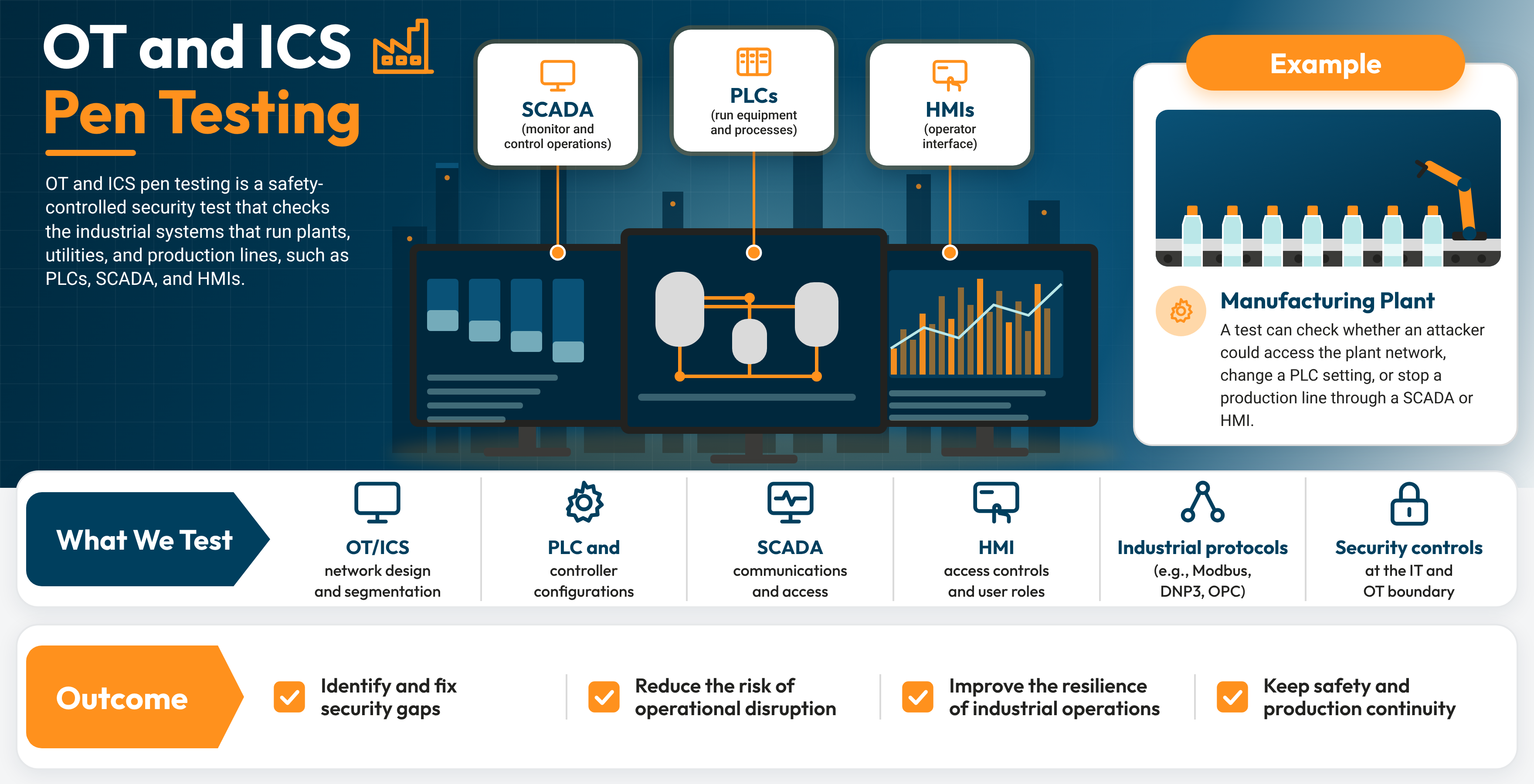
Example: A manufacturer’s test found that the engineering workstation used to update PLCs also sat on the corporate network, with email and web access. The team moved it into its own OT zone with separate login and remote access controls.
Get the eBook: Inside OT, ICS & IoT VAPT: What CISOs Need to Test, Scope, and Defend
AI and LLM Pen Testing
AI and LLM pen testing is a security test that checks chatbots, AI agents, and LLM-powered apps for risks such as prompt injection and data leakage.
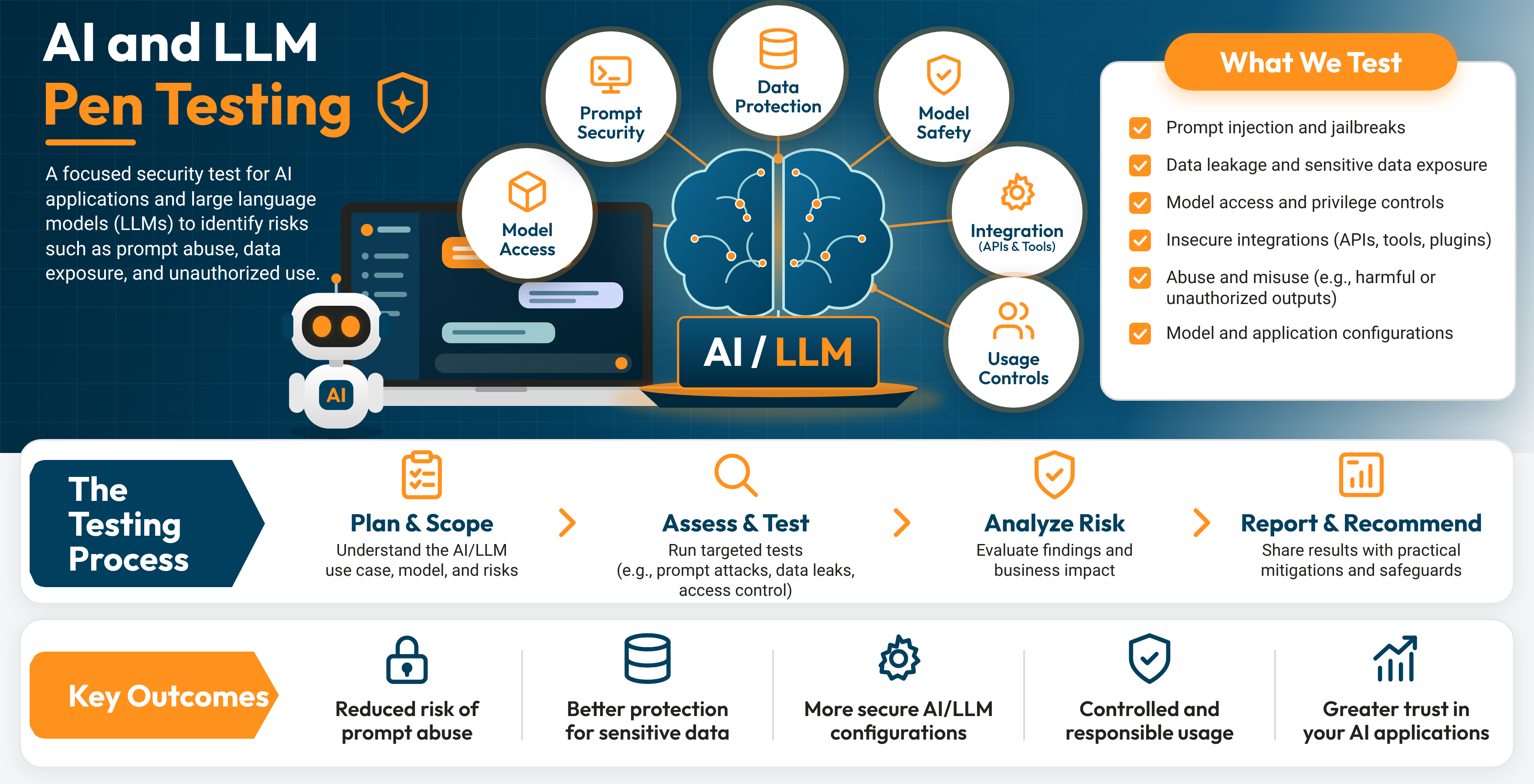
Example: An insurance company’s customer chatbot could pull policy details for any account. A tester used prompt injection to get it to share another customer’s coverage information. The team limited the chatbot to the signed-in customer’s records and added a filter that checks every response before it goes out.
Types of Pen Tests by Tester Knowledge
How much the tester knows on day one shapes how deep the test goes.
- Black Box Pen Testing: Black box pen testing is a pen test where the tester starts with only public information, such as a company name or website, to mirror an outside attacker’s view.
- Gray Box Pen Testing: Gray box pen testing is a pen test where the tester starts with limited access, such as a standard user account, to balance realism with coverage.
- White Box Pen Testing: White box pen testing is a pen test where the tester gets full information, including source code, network diagrams, and admin access, for the deepest coverage.
- Assumed Breach: An assumed breach test is a pen test that starts from a compromised employee device or account to measure how far an attacker could go from the inside.
- Purple Teaming: Purple teaming is a joint exercise where pen testers and an organization’s security teamwork side by side to run attacks and tune detection in real time.
How to Scope a Pen Test
To scope a pen test, set clear goals, list every in-scope asset, agree on the rules of engagement, and pick a testing window. A pen test scope is the written agreement that defines what the tester will test, how they will test it, and when. Once both sides sign it, the scope becomes your pen test plan.
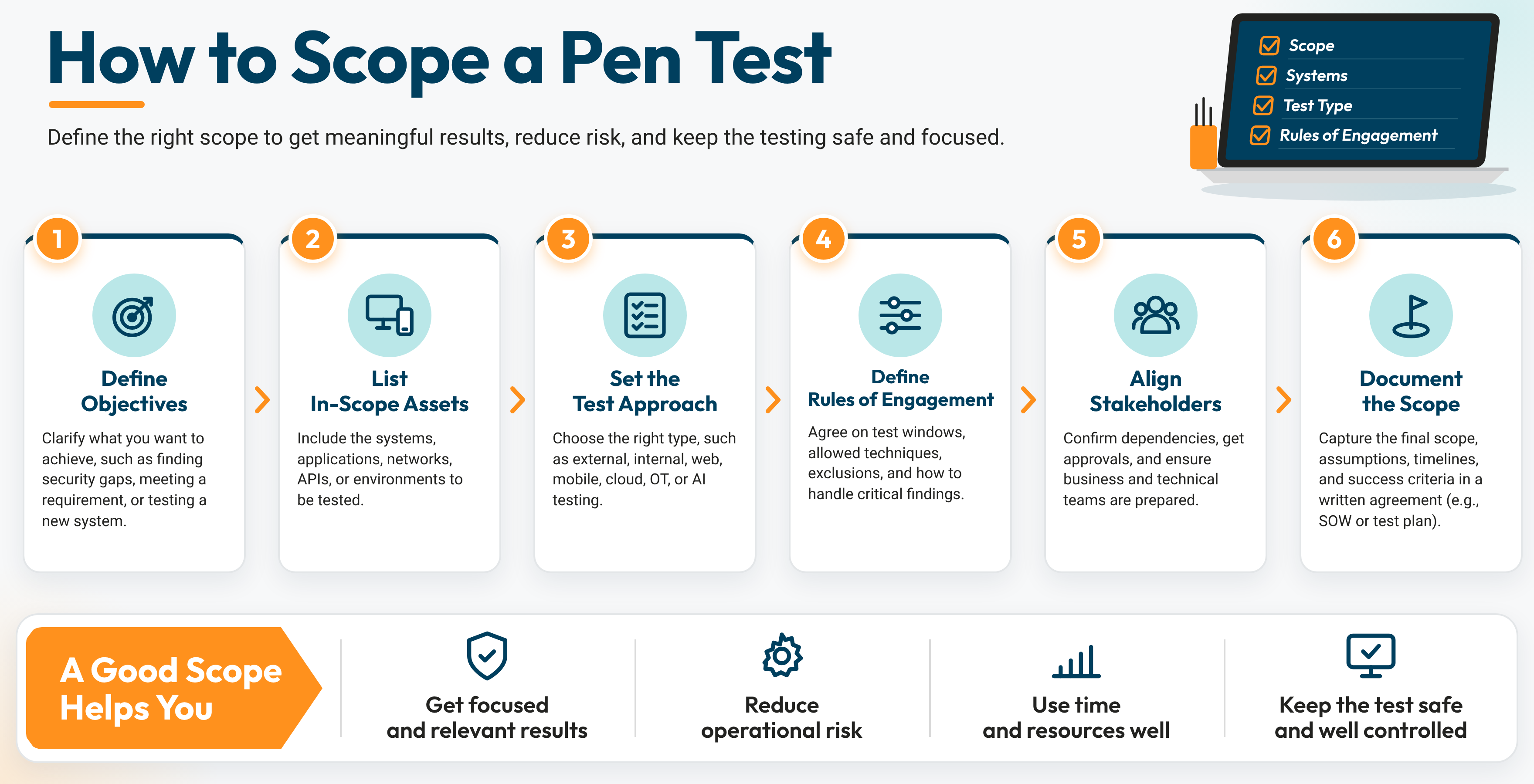
Set Clear Goals
Every scope starts with one question: what do you need this test to prove? Your answer shapes everything that follows.
- Compliance Evidence: A PCI DSS or SOC 2 audit calls for a report that maps to that framework’s requirements.
- Launch Readiness: A new customer portal needs a web application test before go-live.
- Breach Readiness: An assumed breach test shows how far an attacker could move from one compromised laptop.
- Customer Requests: An enterprise buyer may ask for a recent third-party test on the product it plans to buy.
Map Your Attack Surface
Your attack surface is every system an attacker could reach. List each in-scope asset by name and address: domains, IP ranges, web apps, APIs, cloud accounts, office locations, and employee groups for phishing simulations. Then list the excluded systems, such as a legacy payroll server or a vendor-hosted platform. A clear list keeps the tester focused and protects the systems you need running.
Set the Rules of Engagement
The rules of engagement tell the tester exactly how to work. A strong set covers:
- Approved Techniques: Which methods the tester can use, such as phishing, password attacks, or physical entry.
- Data Handling: How the tester stores, uses, and deletes any data they access.
- Escalation Path: Who the tester calls the moment they find a critical vulnerability.
- Stop Conditions: The events that pause the test, such as a system slowdown or an unexpected outage.
Choose the Testing Window
The testing window sets the dates and hours for active testing. Many teams test production systems after business hours and test staging systems during the day. Block out freeze periods like quarter-end close, holiday sales, or a major release.
What Affects Pen Test Effort
Five factors drive how long a test runs and what it costs:
- Number of Assets: More IP addresses, apps, and cloud accounts add testing time.
- Application Complexity: Every user role, payment flow, and API endpoint adds test cases.
- Tester Knowledge: A white box test moves faster per asset than a black box test.
- Environment: Production testing calls for tighter controls and slower pacing.
- Reporting Needs: Framework-mapped reports and attestation letters add documentation time.
For price ranges, read how much pen testing costs.
Pen Test Checklist
Most test delays trace back to something small. The authorization letter is still waiting on a signature, the test accounts don’t exist yet, or the cloud provider never got notified. A well curated Pen Test Pre-Flight Checklist (like the one below) catches every one of those before kickoff day.
Inside, you get seven checkpoints that take your pen test from a rough idea to a signed, launch-ready plan:
- Goals and Drivers: Lock in why you’re testing and what a successful test proves.
- Team and Contacts: Name the person who signs, the person who answers, and the person who takes the after-hours call.
- Asset Inventory: Fill in a worksheet that lists every in-scope and excluded system.
- Rules of Engagement: Agree on approved techniques, data handling, and stop conditions.
- Testing Window: Set dates and hours, and block out your busiest business periods.
- Access, Safety, and Approvals: Check off accounts, backups, and third-party sign-offs.
- Reporting and Retest: Decide who reads the report and how you prove each fix.
It ends with a Launch Readiness Board. When every checkpoint reads GO, your test is ready to fly.

Pen Testing Methods and Stages
A pen testing methodology is the repeatable framework a tester follows to plan, run, and report a pen test. Recognized methodologies keep every test consistent, thorough, and easy for auditors to trust.
Recognized Pen Testing Methodologies
Most testers mix these four frameworks, picking each one for what it does best:
- PTES (Penetration Testing Execution Standard): A full-lifecycle framework that runs from pre-engagement and intelligence gathering through threat modeling, vulnerability analysis, exploitation, post-exploitation, and reporting.
- NIST SP 800-115: NIST’s technical guide to security testing. It organizes a pen test into planning, discovery, attack, and reporting, and compliance teams lean on it for audit-ready documentation.
- OWASP Web Security Testing Guide: The go-to checklist for web apps and APIs. It covers authentication, session handling, input validation, and access control.
- MITRE ATT&CK: A knowledge base of real-world attacker tactics and techniques. Testers use it to pick realistic pen testing techniques and to map each finding to how actual attackers operate.
Different pen testing methods use different combinations. A web app test leans on the OWASP guide. A network test follows PTES or NIST. A red team exercise builds its plan from MITRE ATT&CK.
Pen Testing Steps: A Real-World Pen Testing Example
The pentest phases below follow one anonymized engagement from start to finish. The client is a regional healthcare billing company. Its goal is to find out whether an outside attacker could reach patient billing records.
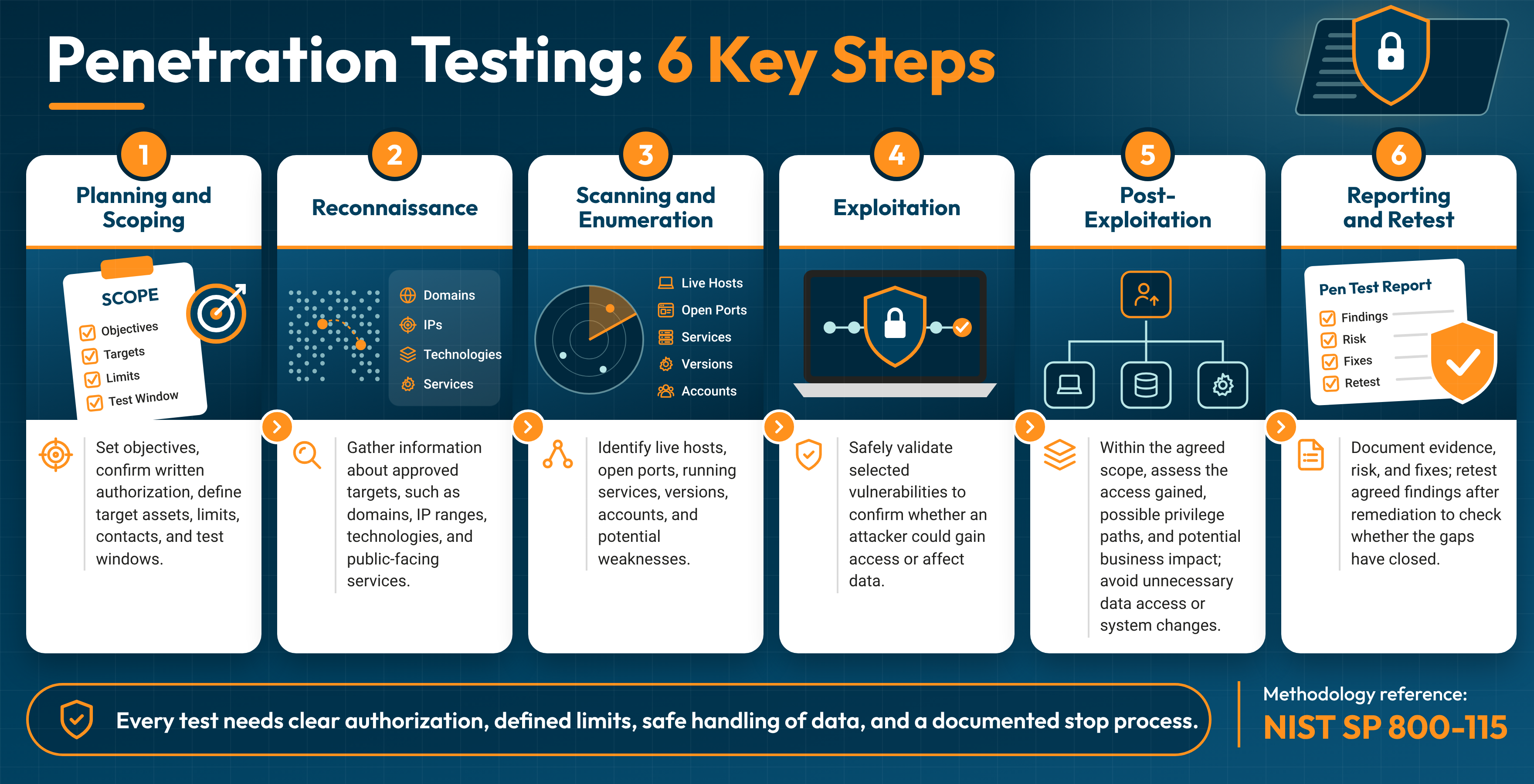
1. Planning and Scoping
The tester and the client agree on goals, in-scope assets, rules of engagement, and a testing window.
In this test: The scope covered the patient payment portal and the company’s external IP range. The rules required the tester to stop and call the security lead the moment patient data came into view.
See How to Scope a Pen Test for the full process.
2. Reconnaissance
The tester gathers public information about the target, a practice called OSINT (open-source intelligence). Sources include the company website, job postings, social media, and public DNS and certificate records.
In this test: Public certificate records listed an old staging version of the payment portal. It was still running and reachable from the internet.
3. Scanning and Enumeration
Scanning is performed in this phase, right after reconnaissance and before exploitation. The tester maps live systems, open ports, running services, and software versions, then flags likely weak spots. Testers also run focused scans later in the test, each time they reach a new part of the network.
In this test: Scans showed the staging portal ran an older build of the app than production. A search field on that portal looked promising for deeper testing.
4. Exploitation
The tester tries to break in through the weaknesses found so far, and this stage proves which risks are real. Common pen testing techniques here include SQL injection, which can change a database query through crafted input, and cross-site scripting, which can run an attacker’s script in another user’s browser. Testers also check for weak or reused passwords, misconfigured cloud storage, and, when the scope allows, employee responses to a phishing simulation.
In this test: The tester confirmed a SQL injection flaw in the staging portal’s search field. It exposed the app’s user table, including an admin account.
5. Post-Exploitation
The tester measures how far an attacker could go after the first break-in. Two techniques drive this stage. Privilege escalation turns a standard account into admin rights, and lateral movement uses one compromised system to reach the next.
In this test: The staging server’s service account shared a password with the production database server. That gave the tester a path into production, followed by admin rights through a misconfigured service. The tester stopped at a small sample of billing records and alerted the security lead, exactly as the rules required.
6. Reporting and Retest
The tester documents every finding with proof, a severity rating, and clear fix steps, then confirms each fix in a retest.
In this test: The report showed one connected attack path, from a public staging site to patient billing data. The team shut down the staging site, fixed the search query code, gave every service account its own password, and separated staging from production. The retest confirmed each fix.
How AI Is Changing Pen Testing in 2027
AI is changing pen testing in three ways. It speeds up how testers find weaknesses. It turns AI systems themselves into a new target. And it moves pen testing from a once-a-year event to a continuous process.
The speed shift is already here. In Anthropic’s Project Glasswing, about 50 partner organizations used the Claude Mythos Preview model to find “more than ten thousand high- or critical-severity vulnerabilities” in its first month. Anthropic reports that some of these flaws had survived decades of human review and millions of automated security tests.7
AI-Assisted and Automated Pen Testing
Automated pen testing uses software, and more and more often AI agents, to run reconnaissance, scanning, and known exploit checks across large environments at machine speed. An automated pen test can map thousands of assets overnight, sort findings by risk, and draft the first version of the report.
Agentic AI goes a step further. AI agents can now chain steps together, pick their next move based on what they just found, and keep testing for hours. That gives human testers more time for the work that needs judgment.
LLM Pen Testing and AI Red Teaming
Every chatbot, AI agent, and LLM-powered app a company launches adds to its attack surface. IBM’s 2026 Cost of a Data Breach research found that “More than 20% of organizations reported a breach targeting AI models or applications.”8 The most common causes were compromised APIs, applications, or plug-ins (27%) and cloud misconfigurations affecting AI workloads (27%).8
LLM pen testing is a security test that checks AI applications for risks such as prompt injection, sensitive data leakage, and excessive agent permissions. Testers follow the OWASP Top 10 for LLM Applications. They also use the OWASP Top 10 for Agentic Applications, which the OWASP GenAI Security Project released in December 2025.9 That list covers agent-specific risks such as Agent Goal Hijack, Tool Misuse, and Identity & Privilege Abuse.
AI red teaming takes a wider view. It tests how an AI system behaves under realistic pressure from attackers, including manipulation, misuse, and attempts to pull out its training data or hidden instructions.
Continuous Pen Testing and PTaaS
Attackers use AI too. IBM found that “One in four malicious breaches were AI-enabled – a 56% increase over last year.”8 As attacks speed up, many organizations are moving from a single yearly test to continuous pen testing.
Continuous pen testing runs on an ongoing schedule and tests each new release, cloud change, or newly exposed asset as it appears. Pen testing as a service (PTaaS) delivers this through a subscription platform. It gives you on-demand tests, a live dashboard of findings, direct messaging with testers, and fast retests after each fix.
Where Tester Judgment Still Matters
AI finds flaws faster than ever. People still decide what those flaws mean. Anthropic’s own Glasswing update notes that “the bottleneck in fixing bugs like these is the human capacity to triage, report, and design and deploy patches for them.”6
A human-in-the-loop approach keeps experienced testers in charge of the moments that count:
- Business Logic Flaws: Spotting that a refund flow pays out twice, or that a discount code stacks without limit.
- Attack Path Chaining: Linking three medium-risk findings into one critical path to customer data.
- Safety Calls: Pausing the test the moment a production system slows down.
- Business Context: Ranking findings by what matters to your operations, your customers, and your auditors.
The strongest programs in 2027 pair AI speed with human judgment. AI covers the ground, and expert testers decide what to do about
Helpful Pen Testing Tools
Pen testing tools are the software testers use to find, confirm, and document security weaknesses. Each tool fits a specific stage of the test. The table below maps the main categories to the stage where each one does its work.
| Stage | Tool Category | Common Tools | What It Does |
|---|---|---|---|
| Reconnaissance | OSINT tools | Search engines, DNS and certificate lookups | Collects public details about domains, staff, and exposed systems |
| Scanning and Enumeration | Network scanners | Nmap | Maps live hosts, open ports, and running services |
| Scanning and Enumeration | Vulnerability scanners | Nessus | Checks systems against a database of known flaws |
| Exploitation | Web app testing proxies | Burp Suite, OWASP ZAP | Captures and changes web traffic to test logins, forms, and APIs |
| Exploitation | Exploitation frameworks | Metasploit | Confirms whether a known flaw leads to real access |
| Post-Exploitation | Traffic analyzers | Wireshark | Reads network traffic to spot exposed data and weak protocols |
| Reporting | Reporting platforms | PTaaS dashboards, report templates | Organizes evidence, severity ratings, and fix steps |
Kali Linux Pen Testing Tools
Kali Linux is a free operating system built for security testing. It comes with a large set of pre-installed tools, including Nmap, Metasploit, Wireshark, and Burp Suite Community Edition. Most testers start here because one install gives them a full working toolkit. Kali Linux pen testing tools cover every stage, from reconnaissance through post-exploitation.
How to Choose the Best Pen Testing Tools
The best pen testing tools depend on the target, not on a single top-ten list:
- Web Apps and APIs: Burp Suite Professional or OWASP ZAP, paired with the OWASP Web Security Testing Guide.
- Networks: Nmap for discovery, Nessus for known-flaw checks, and Metasploit for confirmation.
- Cloud: Provider-native tools for AWS, Azure, and Google Cloud, plus open-source configuration auditors.
- Wireless and Traffic: Wireshark for packet analysis.
Commercial pen test software adds team collaboration, scheduled scans, and polished reports. Open-source tools offer flexibility and full visibility into how they work. Strong testing teams use both.
Where Tools Stop and Testers Take Over
Tools excel at speed and coverage. A scanner checks thousands of systems against known flaws in hours. Testers handle the work that calls for judgment:
- Business Logic: Spotting that a checkout flow accepts a negative quantity.
- Attack Chains: Linking several low-risk findings into one path to sensitive data.
- False Alarm Review: Confirming which scanner alerts reflect real, exploitable risk.
- Business Context: Ranking each finding by what it means for your operations.
The tool finds the signal. The tester explains what it means and how to fix it.
Pen Test Reports, Fixes, and Retesting
The test wraps up in a few weeks. The report drives your security work for months after that. A strong pen testing report tells executives what’s at risk, tells engineers exactly what to fix, and gives auditors the proof they need.
What a Pen Testing Report Includes
Every report should give each reader what they need:
- Executive Summary: A plain-language overview of overall risk, the most serious findings, and the top fixes.
- Scope and Methodology: What the tester covered, when, and which frameworks guided the work.
- Attack Narrative: The step-by-step path the tester followed, from first access to final impact.
- Pen Test Findings: One entry per weakness, with severity, evidence, business impact, and fix steps.
- Remediation Roadmap: Fixes grouped by priority and owner.
Annotated Sample Finding
Here’s how one finding from a sample pen test report reads, using the healthcare billing example from earlier in this guide:
| Field | Sample Entry | What It Tells You |
|---|---|---|
| Finding ID | PT-01 | Tracks the finding through fix and retest |
| Title | SQL Injection in Staging Portal Search | Names the flaw and where it lives |
| Severity | Critical (CVSS v4.0) | Sets how fast the fix needs to happen |
| Affected Asset | staging.portal.example.com | Points your team to the exact system |
| Proof of Concept | Screenshots and request logs showing the search field returning the app’s user table | Proves the risk is real and repeatable |
| Business Impact | Opens a path to patient billing records in production | Translates the flaw into business terms |
| Remediation | Switch the search to parameterized queries, retire the staging site, and give each service account its own password | Gives engineers clear, specific fix steps |
| Retest Status | Closed: fix confirmed | Shows the risk is resolved |
Read more: How to Read a Pen Test Report
How CVSS Severity Ratings Work
Most reports rate each finding with CVSS, the Common Vulnerability Scoring System. Every score runs from 0 to 10 and maps to a severity band. Under CVSS v4.0, the NIST National Vulnerability Database lists these bands: Low runs from 0.1 to 3.9, Medium from 4.0 to 6.9, High from 7.0 to 8.9, and Critical from 9.0 to 10.0.10
CVSS measures how severe a flaw is. Your business context decides the actual risk. A High finding on a public payment page usually outranks a Critical finding on an isolated test server, and a strong report weighs both.
Remediation and Retesting
Remediation turns findings into fixes. Most teams follow four steps:
- Triage: Rank findings by severity and business impact together.
- Assign: Give every finding an owner and a target fix date.
- Fix: Patch, reconfigure, or rewrite code following the report’s guidance.
- Retest: Ask the tester to rerun each attack and confirm the fix holds.
After a clean retest, many providers issue an attestation letter. It’s a short, shareable summary that confirms the test took place and the critical findings were resolved. Customers, auditors, and cyber insurers often ask for one.

How Much Pen Testing Costs
A single manual pen test from a third-party firm typically costs $10,000 to $50,00011 and takes weeks to complete, according to Forbes. Where your test lands in that range depends on what you test, how complex it is, and how long the work takes. A focused test of one web app sits near the low end. A multi-week test of a hybrid cloud network sits near the top. Scope sets the price more than anything else.
What Drives Pen Testing Pricing
Every quote comes down to tester hours. These factors set how many hours a test needs:
- Scope: The number of IP addresses, web apps, APIs, cloud accounts, and office locations in the test.
- Application Complexity: Each user role, payment flow, integration, and API endpoint adds test cases.
- Testing Duration: Longer testing windows allow deeper exploitation and attack path chaining.
- Tester Starting Point: Black box tests need more reconnaissance time than gray box or white box tests.
- Environment: Production systems call for after-hours testing and tighter safety controls.
- Reporting Needs: Framework-mapped reports, executive readouts, and attestation letters add documentation time.
- Retesting: Some quotes include a retest of every finding, and others price it separately.
The clearer your scope, the tighter your quote. A signed scope with every asset listed gives providers what they need to price the work accurately and compare fairly. For a full breakdown by test type and industry, read how much pen testing costs.
How Often to Run a Pen Test
An annual pen test is the baseline for most organizations. PCI DSS calls for internal and external pen tests at least once every 12 months and after any significant change. Plan an extra test after these events:
- A major application release or redesign
- A cloud migration or new cloud environment
- A merger, acquisition, or new office network
- A new customer-facing app or API
Teams that ship code every week often move to continuous pen testing or PTaaS to keep testing in step with each release.
How to Choose a Pen Testing Provider
Choose a provider that explains its methodology, shares a sample report, includes a retest, and backs its team with recognized certifications and client references. Those five points show how the provider tests, what you’ll receive, and who does the work.
Questions to Ask a Provider
Bring these questions to every provider call:
- Methodology: Which frameworks guide your testing, such as PTES, NIST SP 800-115, or the OWASP Web Security Testing Guide?
- Sample Report: Can we see a redacted report from a similar engagement?
- Retest Policy: Does the quote include a retest of every finding, and how soon after the fix?
- Certifications: Which certifications do the assigned testers hold, such as OSCP, GPEN, or CREST?
- References: Can we speak with a client in our industry or of our size?
- Manual Testing: How many hours of hands-on testing does the proposal include?
- Escalation: How quickly do you report a critical finding during the test?
Signs of a Quality Pen Test
Strong providers make their process easy to see from the first call:
- A scoping call before the quote, with questions about your assets, users, and goals
- A proposal that lists testing hours, named testers, and the testing window
- Findings backed by proof of concept, business impact, and specific fix steps
- An attack narrative that shows how individual findings connect
- A readout meeting with both your executives and your engineers
How to Tell a Pen Test From a Scan
A real pen test proves which weaknesses an attacker can exploit and how far they can go. A vulnerability scan lists possible weaknesses. Ask every provider for three things: hours of manual testing in writing, proof of exploitation in the sample report, and an attack narrative. A quality pen test includes all three.
For a full buyer’s guide, read how to choose a pen testing provider
What to Look for in a Pen Tester
A qualified pen tester pairs recognized certifications with hands-on experience in environments like yours. Look for these credentials:
- OSCP: A hands-on certification. Candidates must break into live lab systems to pass.
- GPEN: GIAC’s certification covering pen testing methods and reporting.
- CompTIA PenTest+: A vendor-neutral certification covering planning, testing, and reporting.
- CEH: EC-Council’s broad certification in ethical hacking concepts and tools.
- CREST: An accreditation for both individual testers and testing companies.
Then ask about experience: how many tests the tester has run on your type of environment, and in your industry.
Conclusion: Put Pen Testing to Work in 2027
Pen testing gives your security program proof. A strong test shows exactly which weaknesses an attacker can use, ranks every finding by real business risk, and hands your team a clear fix list. AI now speeds up how testers find flaws. Experienced testers still decide what each finding means for your business.
Three steps get you started:
- Scope It: List your goals, assets, rules, and testing window with the Pen Test Pre-Flight Checklist.
- Test It: Match the test type to your biggest risk, whether that’s a web app, your cloud, or the plant floor.
- Fix It: Work through the report by priority, then retest to prove every fix holds.
Sources
- Verizon, “Vulnerability exploitation top breach entry point, 2026 industry-wide DBIR finds,” May 19, 2026: https://www.verizon.com/about/news/breach-industry-wide-dbir-finds
- PCI Security Standards Council, PCI DSS v4.0.1, Requirement 11.4, Document Library: https://www.pcisecuritystandards.org/document_library/
- AICPA & CIMA, “2017 Trust Services Criteria (With Revised Points of Focus, 2022)”: https://www.aicpa-cima.com/resources/article/2017-trust-services-criteria-with-revised-points-of-focus-2022
- ISO, “ISO/IEC 27001:2022, Information Security Management Systems, Requirements”: https://www.iso.org/standard/27001
- European Central Bank, “TIBER-EU Framework: How to Implement the European Framework for Threat Intelligence-Based Ethical Red Teaming,” January 2025: https://www.ecb.europa.eu/pub/pdf/other/ecb.tiber_eu_framework_2025~b32eff9a10.en.pdf
- Anthropic, “Project Glasswing: An Initial Update,” May 22, 2026: https://www.anthropic.com/research/glasswing-initial-update
- Anthropic, “Project Glasswing: Securing Critical Software for the AI Era”: https://www.anthropic.com/glasswing
- IBM Newsroom, “IBM Study: One in Four Malicious Breaches are AI-Enabled, Costing Companies $6 Million on Average,” July 29, 2026: https://newsroom.ibm.com/2026-07-29-ibm-study-one-in-four-malicious-breaches-are-ai-enabled,-costing-companies-6-million-on-average
- OWASP GenAI Security Project, “OWASP Top 10 for Agentic Applications,” December 9, 2025: https://genai.owasp.org/2025/12/09/owasp-top-10-for-agentic-applications-the-benchmark-for-agentic-security-in-the-age-of-autonomous-ai/
- NIST National Vulnerability Database, “Vulnerability Metrics (CVSS)”: https://nvd.nist.gov/vuln-metrics/cvss
- Forbes, Janakiram MSV, “AWS Deploys AI Agents To Do The Work Of DevOps And Security Teams,” April 1, 2026: https://www.forbes.com/sites/janakirammsv/2026/04/01/aws-deploys-ai-agents-to-do-the-work-of-devops-and-security-teams/