
Website penetration testing helps organizations evaluate how well their web applications protect data, users, and business operations. A website often includes login portals, payment workflows, APIs, admin functions, and integrations. Each component creates a potential entry point. Testing these components helps teams uncover security weaknesses and understand how an attacker could exploit them.
This guide explains the testing process, the tools testers use, and the security areas they examine. It also shows how organizations turn findings into actionable improvements.
Also Read: How Often Should You Pen Test? A Guide to Penetration Testing Frequency
What Website Pen Testing Covers
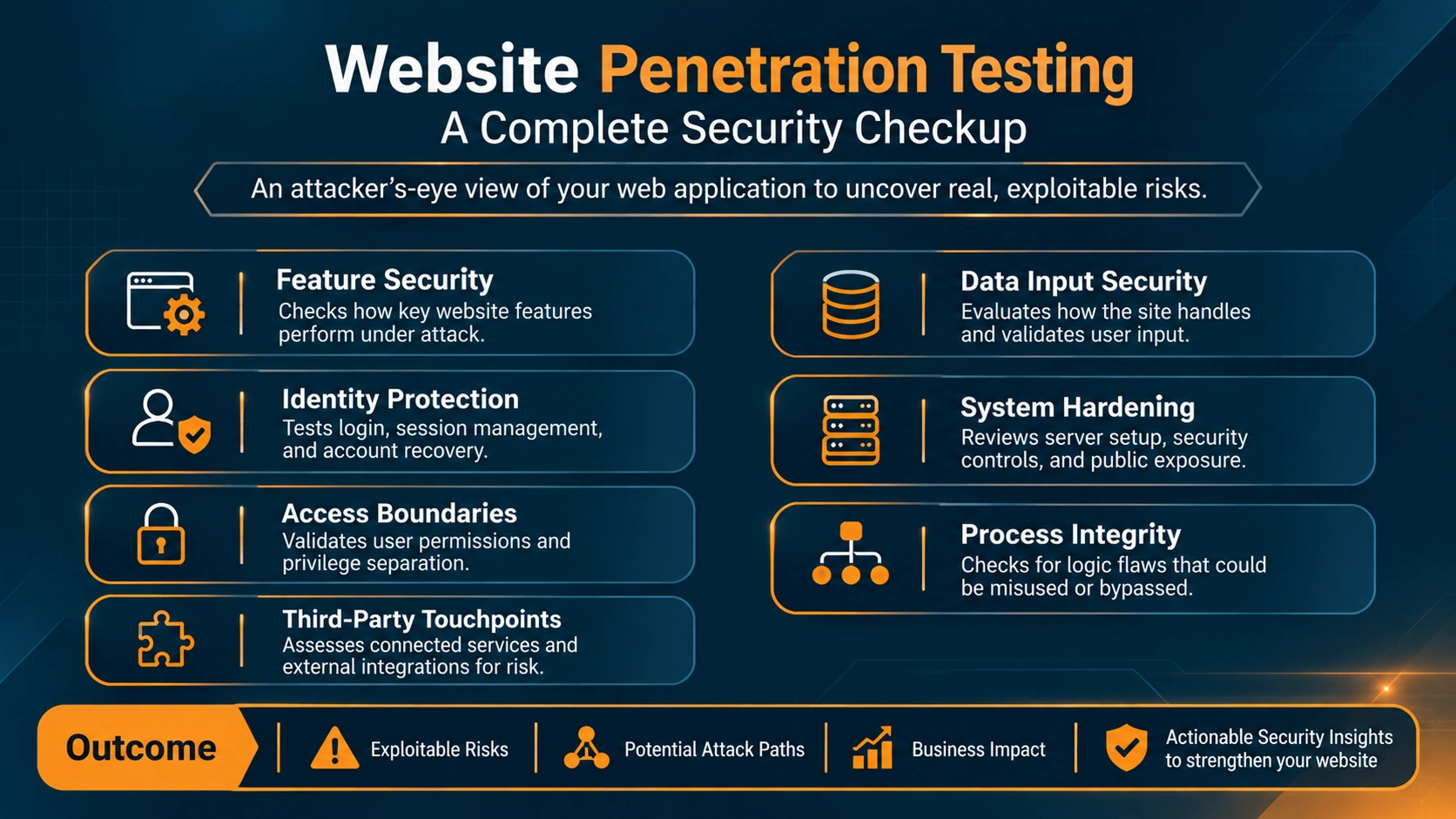
Website penetration testing evaluates how well a website or web application protects its data, functions, and users from attacks. A website pen test examines exposed features, application behavior, authentication, and access controls. It also reviews input handling, configurations, and connected services to identify exploitable weaknesses.
The site's purpose, architecture, and risk profile shape the scope of each web application pen test. Common areas include:
- Examining Application Functionality: Forms, search, account settings, checkout workflows, and file uploads.
- Evaluating Authentication and Sessions: Login, password reset, multi-factor authentication, and session tokens.
- Verifying Access Control: Permissions, restricted pages, user roles, and access to sensitive records.
- Analyzing Input Handling: How the application processes user-supplied data.
- Reviewing Configuration and Exposure: Security headers, TLS, exposed services, directory listings, and information disclosure.
- Testing Business Logic: Transaction rules, workflow sequences, pricing, and account actions.
- Assessing Integrations and APIs: Connected services and API endpoints within the authorized scope.
The scope should reflect the organization's priorities and clearly define the included assets. When authorization permits, testing can extend to the web server, hosting configuration, and third-party components. Penetration testing combines automated checks with manual validation. Testers confirm each finding and assess its practical impact on confidentiality, integrity, availability, and business operations.
Authorization and Scope: Setting the Foundation
Before testing begins, establish written authorization, define the scope, and agree on the rules of engagement. These details clarify which systems testers can assess and which activities they can perform. They also guide how testers handle unexpected findings.
Written authorization confirms permission from the website owner or an authorized representative. It should identify the target systems, testing dates, and approved activities. Testing third-party infrastructure, hosting platforms, or integrated services may require separate permission.
Scope definition identifies the domains, subdomains, IP addresses, applications, APIs, environments, and user roles in the assessment. It also specifies excluded assets and any testing restrictions.
Rules of engagement set out how testing proceeds. They cover testing hours, acceptable techniques, rate limits, data handling, emergency contacts, and conditions for pausing the assessment.
For example, an engagement may authorize testing of a customer portal and its APIs in a staging environment. The same engagement may exclude the payment provider's infrastructure. Clear boundaries help testers work safely and coordinate with application owners. They also keep findings aligned with the agreed objectives.
Also Read: Black Box vs. White Box vs. Gray Box Penetration Testing: Key Differences and Use Cases
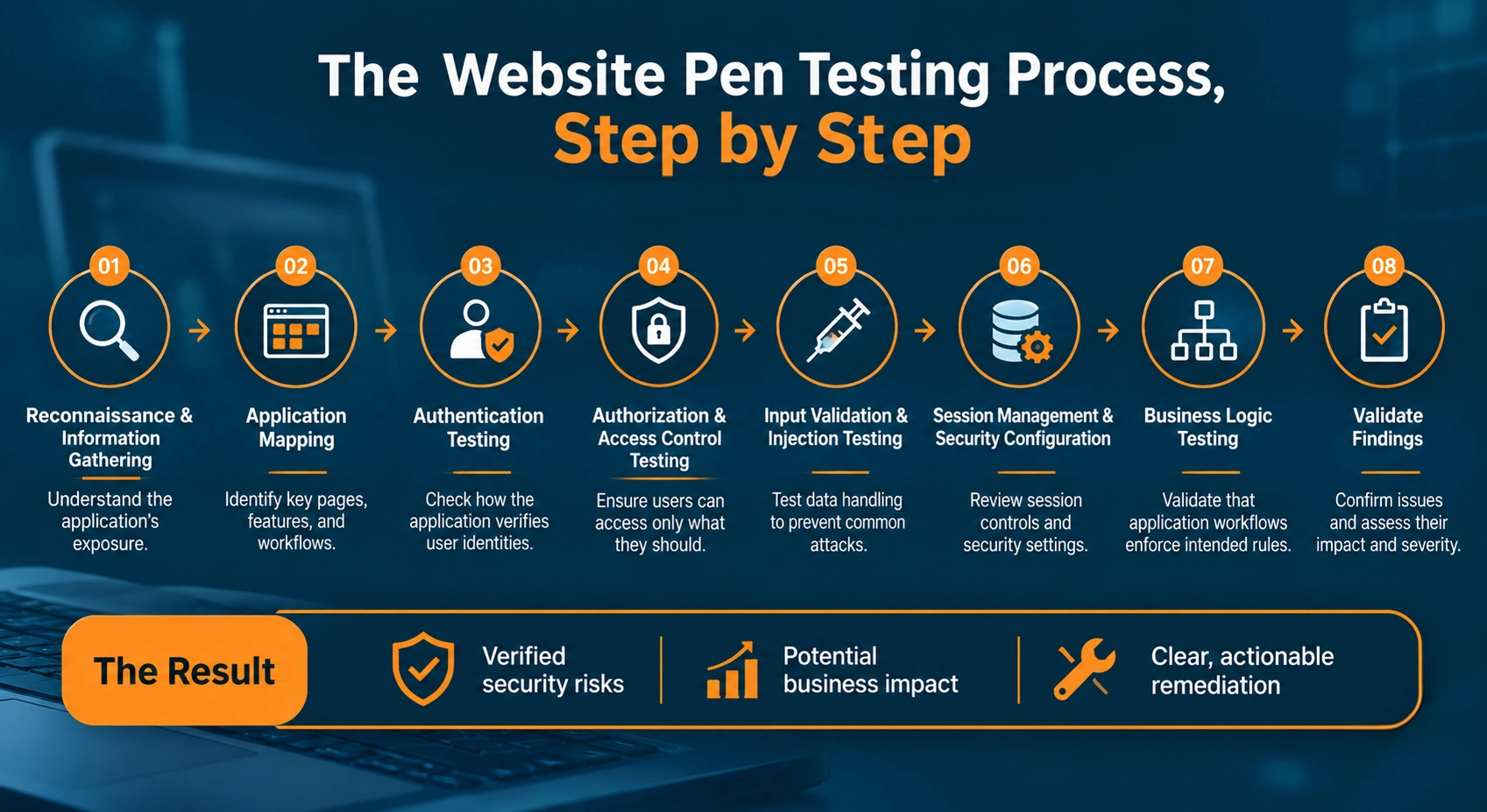
The Website Pen Testing Process, Step by Step
The following steps outline how a web application pen test typically progresses.
Step 1: Reconnaissance and Information Gathering
Reconnaissance helps testers understand the website's public footprint. It also reveals technologies, components, and potential entry points within the authorized scope.
Testers review DNS records, subdomains, certificates, public pages, technology stacks, and application documentation. They may also examine JavaScript files, page source code, and other public information that shows how the application operates.
Browser developer tools and technology fingerprinting utilities help testers identify application components. These tools build an initial picture of the environment.
The goal is to understand the website's exposure and pinpoint areas that warrant closer examination.
Step 2: Application Mapping
Application mapping identifies the website's pages, features, inputs, workflows, and connections. Testers navigate the application under different user roles and document how its functions interact.
Mapping may include:
- Reviewing forms, search fields, and URL parameters
- Testing login, registration, and password recovery
- Tracing file upload and download functionality
- Exploring account settings and administrative features
- Capturing API endpoints and application requests
- Documenting user workflows and role-specific functions
Burp Suite helps testers capture and organize HTTP requests and responses during this process. Its proxy reveals application traffic, including parameters, cookies, headers, and requests from interactive features.
Mapping shows testers how the application works before they evaluate its security.
Step 3: Authentication Testing
Authentication testing examines how the website verifies user identities and protects account access.
Testers review login functionality, password recovery, multi-factor authentication, and account lockout mechanisms. They also check session creation, logout behavior, and whether authentication controls work consistently across features.
For example, a password reset process should verify the user's identity and use well-protected reset tokens. It should also handle token expiration correctly. Testers evaluate these controls within the approved scope to identify weaknesses that could expose user accounts.
Step 4: Authorization and Access Control Testing
Authorization testing checks whether users can access only the resources and functions their roles permit.
Testers compare access across user accounts and examine how the application enforces permissions for pages, actions, and records. They assess horizontal access between users and vertical access between privilege levels.
Insecure Direct Object References (IDOR) are one area of focus. An application may use record identifiers in URLs or API requests to retrieve customer information, orders, or documents. Testers check whether the server verifies access permissions for each requested resource.
A properly implemented authorization control enforces permissions on the server side, independent of interface restrictions.
Step 5: Input Validation and Injection Testing
Input testing evaluates how the application processes data from forms, parameters, headers, cookies, and APIs.
Testers examine areas linked to SQL injection, cross-site scripting (XSS), command injection, path traversal, and other input-handling weaknesses. They submit controlled test inputs and observe how the application processes, validates, and responds to them.
For example, a search feature may query a database or display user-supplied content. Testing examines whether the application handles input safely and whether its processing creates unintended behavior.
Each potential finding requires careful validation. Error messages, unusual responses, or unexpected page behavior may signal an issue. Testers then establish whether the behavior represents a security vulnerability and determine its potential impact.
Step 6: Session Management and Security Configuration
Session testing examines how the application maintains authenticated user activity. Testers review session expiration, token handling, cookie attributes, logout behavior, and session invalidation.
They may also assess security configurations. These include HTTPS enforcement, security headers, exposed admin interfaces, default settings, and unnecessary information disclosure.
These checks help identify weaknesses in application configuration and session protection.
Step 7: Business Logic Testing
Business logic testing examines whether application workflows enforce their intended rules.
Testers evaluate how features behave when users perform actions in different sequences, modify transaction details, or repeat operations. They also explore how functions respond to unexpected interactions.
For example, an online store may set rules for discounts, order quantities, refunds, and payment completion. Testing examines whether the application enforces those rules consistently across its interface and backend processing.
These assessments often call for manual investigation. Understanding the application's intended business behavior requires human judgment beyond the reach of automated scanners.
Step 8: Validate Findings
Testers validate potential vulnerabilities, document evidence, and assess their practical significance. They separate confirmed vulnerabilities from informational observations and configuration recommendations.
Each final finding explains the affected component, observed behavior, potential impact, severity, and recommended remediation. This creates a clear foundation for reporting and remediation.
Going Beyond the OWASP Top 10 in Website Pen Testing
The OWASP Top 10 gives testers a baseline for identifying common web application security risks. It helps them prioritize assessment areas and organize testing around high-impact vulnerabilities. It covers broad risk categories, and each website may carry additional weaknesses beyond them.
During OWASP Top 10 pen testing, testers examine areas such as:
- Detecting broken access control: Unauthorized access to restricted resources, functions, or user data.
- Identifying injection flaws: Unsafe processing of user input, including SQL injection and cross-site scripting.
- Uncovering authentication failures: Weaknesses in login mechanisms, account protection, and session handling.
- Spotting security misconfiguration: Exposed services, insecure settings, and improperly configured security controls.
- Evaluating cryptographic failures: Inadequate protection of sensitive data in storage or transit.
Unique workflows, integrations, and business requirements can introduce application-specific vulnerabilities that extend beyond these broad categories.
Business logic flaws are one example. They let users manipulate legitimate features by bypassing approval steps, repeating transactions, misusing discounts, or performing actions out of sequence.
Finding these issues requires testers to understand how the application should operate and how its functions interact. Combining the OWASP Top 10 with manual testing and application-specific scenarios delivers broader security coverage.
API Security Testing: Assessing the APIs Behind the Website
Modern websites rely on APIs to exchange data, process requests, and power application functionality. REST APIs and GraphQL endpoints often handle authentication, account information, transactions, and other operations behind the interface. Testing these interfaces separately surfaces vulnerabilities hidden from normal website navigation.
API penetration testing examines areas such as:
- Checking Broken Object Level Authorization (BOLA): Whether users can access other users' data by manipulating object identifiers in API requests.
- Verifying authentication: How APIs confirm identities, validate tokens, and manage authenticated sessions.
- Testing function-level authorization: Whether users can access API operations beyond their assigned permissions.
- Reviewing data exposure: Whether API responses return sensitive information or unnecessary fields.
- Validating input handling: How APIs process unexpected, malformed, or manipulated request data.
- Assessing rate limiting: Whether APIs control excessive requests and resource consumption.
REST APIs expose resources through endpoints, while GraphQL lets clients request data through queries and mutations. Each architecture brings its own testing considerations.
For example, a customer portal may restrict account details through its interface. An API request, however, could expose another customer's records if the server skips ownership verification. Testing API authorization independently helps identify these weaknesses and their effect on application data and functionality.
| API type | How it works | Key considerations |
|---|---|---|
| REST API | Exposes resources through endpoints and HTTP methods such as GET, POST, PUT, PATCH, and DELETE. | Test object-level authorization, permissions for each operation, exposed data, input validation, and rate limiting across endpoints. |
| GraphQL API | Lets clients request specific data through queries and modify data through mutations, often through a single endpoint. | Test field-level and object-level authorization, excessive data exposure, query depth and complexity limits, and access to sensitive operations. |
What You Get at the End of a Website Pen Test
A website penetration test concludes with a report. The report documents identified vulnerabilities, their potential impact, and recommended remediation. These findings help development, security, and business teams understand the risks and prioritize corrective actions.
A typical penetration testing report includes:
- Executive summary: Outlines the assessment scope, overall findings, and key security risks in a concise format.
- Technical findings: Details each vulnerability, the affected endpoints or components, supporting evidence, severity rating, and potential impact.
- Remediation recommendations: Provides practical guidance for each weakness, including configuration changes, code fixes, or security control improvements.
- Remediation priorities: Organizes findings by severity, exploitability, business impact, and exposure to help teams plan fixes.
- Retesting: Validates implemented fixes to confirm they resolve each vulnerability and checks for any related issues.
Retesting gives a clearer picture of remediation progress and verifies the effectiveness of corrective measures. The final report serves as a reference for security improvements, future assessments, and ongoing risk management.